
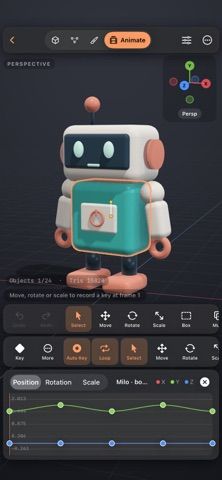
Wax is a 3D modeling and animation app for creating props, characters, and scenes on iPhone or iPad. Users can edit mesh components, sculpt with brushes, paint on layered vertex colors, add modifiers, and animate position, rotation, or scale with keyframes. Projects remain editable as Wax files and can be imported from OBJ or self-contained GLB and glTF models. The developer says core modeling, sculpting, painting, animation, and several export formats are free with unlimited projects. Wax Pro is a one-time purchase that adds boolean operations, voxel remeshing, video exports, and GLB or USDZ exports. The listing does not state the Pro price. Some imports have format limitations, and model import does not preserve animation. Projects are stored on-device and can be shared through Files.
Wax
A mobile 3D modeling and sculpting app with paint layers, animation, modifiers, and model export.
Overview
A closer look at Wax.
A closer look
App screenshots
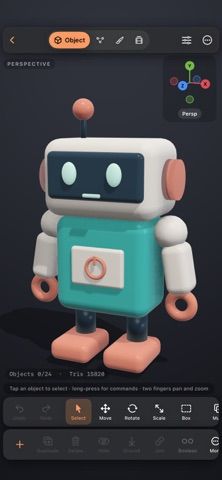
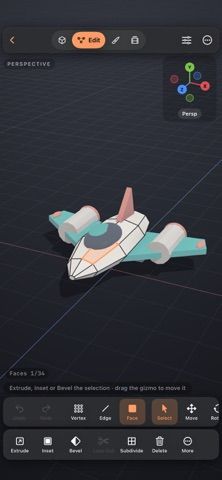
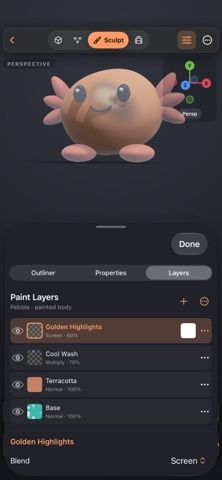
Choose with confidence
The useful details.
What it does
- Edit vertices, edges, and faces and use extrusion, bevels, subdivision, and other modifiers.
- Sculpt meshes and paint layered vertex colors with masks and blend modes.
- Animate position, rotation, and scale using keyframes and a timeline.
- Import supported OBJ, GLB, or glTF models and export Wax projects, OBJ, STL, SDS, or PNG.
A good fit for
- 3D artists who want to model, sculpt, paint, and animate editable scenes on an iPhone or iPad.
Worth knowing
- Some import formats require embedded mesh and texture data; separate buffers and images are not supported.
- Imported models do not bring their animation into Wax.
- Boolean tools, remeshing, video, GLB, and USDZ exports require Wax Pro; its price is not stated.
Frequently asked questions
Answers based on the app’s official listing and reviewed information.
What is Wax used for?
A mobile 3D modeling and sculpting app with paint layers, animation, modifiers, and model export.
What can you do with Wax?
Edit vertices, edges, and faces and use extrusion, bevels, subdivision, and other modifiers. Sculpt meshes and paint layered vertex colors with masks and blend modes. Animate position, rotation, and scale using keyframes and a timeline. Import supported OBJ, GLB, or glTF models and export Wax projects, OBJ, STL, SDS, or PNG.
Who is Wax designed for?
3D artists who want to model, sculpt, paint, and animate editable scenes on an iPhone or iPad.
What should you know before downloading Wax?
Some import formats require embedded mesh and texture data; separate buffers and images are not supported. Imported models do not bring their animation into Wax. Boolean tools, remeshing, video, GLB, and USDZ exports require Wax Pro; its price is not stated.
Does Wax include paid features?
Wax Pro is a one-time purchase with Family Sharing. Current price is shown in the App Store.
Which platforms support Wax?
Greatooly's reviewed app information lists iOS.
Researched from official sources; this is not a hands-on review. Last checked 2026-11-04.
Keep exploring
More apps that might be a good fit.

RoomMakeover: AI Room Design
RoomMakeover previews AI interior-design ideas from room photos, with style controls, credit packs, and Pro plans.

Zu3D
Zu3D combines stop-motion capture, drawing, video editing, green-screen effects, sound, and export tools for animated films.

CreasePad
Draw in a book-style sketchpad with pressure-sensitive tools, PDF annotation, and optional iCloud sync.