
Waylia brings trip planning tools into one iPhone app. Add a destination and the app can draft a day-by-day itinerary that users can adjust, reorder, or extend with their own places. It also offers packing lists, trip budgets, a journal, and collaborative planning with invited friends. The listing describes destination information for visas, recommended vaccines, emergency numbers, and travel advisories, along with a TimeShift schedule for adjusting to a new time zone. An in-app AI travel helper can answer questions using the trip context, while destination discovery tools help compare places or browse travel themes. Waylia is free to download, with Luxe subscriptions listed in the US App Store at $19.99 for three months, $29.99 for six months, or $49.99 for one year. It requires iOS 15.0 or later. Verify travel entry and health guidance with the relevant official sources before departure.

Waylia Trip Planner
Plan a trip with an AI itinerary, packing lists, destination requirements, jet-lag schedules, and shared planning.
Overview
A closer look at Waylia Trip Planner.
A closer look
App screenshots

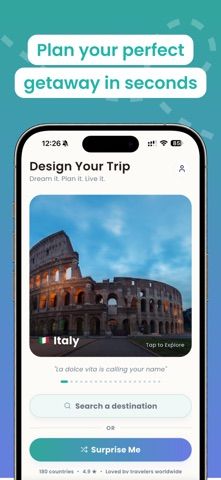
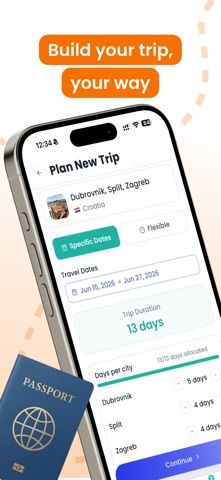

Choose with confidence
The useful details.
What it does
- Generate an AI day-by-day itinerary and adjust activities or add places yourself.
- Create packing lists, track trip budgets, and keep a journal for each journey.
- Review destination visa, health, emergency, and travel-advisory information in one place.
- Use TimeShift to plan sleep, light exposure, and caffeine timing around a time-zone change.
- Invite friends to co-plan a trip and ask the Lia AI helper questions about the itinerary.
A good fit for
- Travelers who want itineraries, checklists, trip notes, and group planning together.
- People planning multi-day trips who want AI suggestions they can edit before travelling.
Worth knowing
- Requires iOS 15.0 or later and an internet connection for AI itinerary or destination-information features.
- Visa, vaccine, safety, and travel-advisory information should be checked against official government and health sources before acting on it.
- Apple's unverified privacy label says identifiers may be used for tracking and lists coarse location, contact details, and crash data.
Frequently asked questions
Answers based on the app’s official listing and reviewed information.
What is Waylia Trip Planner used for?
Waylia combines trip itineraries, packing lists, budgets, destination information, jet-lag planning, and shared trip organization.
Can Waylia create a travel itinerary?
Yes. It can draft a day-by-day plan with AI, and you can reorder activities or add your own places.
Can I plan a trip with friends in Waylia?
The listing describes inviting friends to co-plan and keep a shared itinerary in sync.
Does Waylia provide visa and health information?
The app lists visa requirements, recommended vaccines, emergency numbers, and advisories. Confirm important travel or health details with official sources.
What does Waylia Trip Planner cost?
It is free to download. The US App Store lists Waylia Luxe at $19.99 for three months, $29.99 for six months, or $49.99 for a year.
Which devices support Waylia Trip Planner?
The listing requires iOS 15.0 or later and is designed for iPhone. Greatooly's reviewed platform information lists iOS.
Researched from official sources; this is not a hands-on review. Last checked 2026-11-19.
Keep exploring
More apps that might be a good fit.

Lure – Trip Planner
Create day-by-day city itineraries with custom maps, geographically grouped stops, restaurant ideas, visit estimates, and budget notes.

AeroTrace: Flight Tracker
Track flight status, gates, delays, and connections with Live Activities, boarding-pass import, airport tools, and offline maps.

EzRoute - Travel
Browse and share day-by-day itineraries from travelers, with places, meals, activities, transport notes, and tips.