
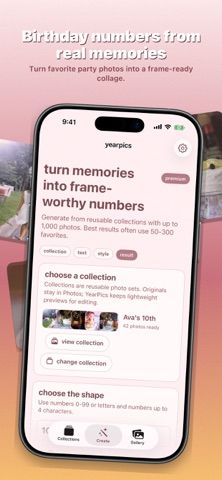
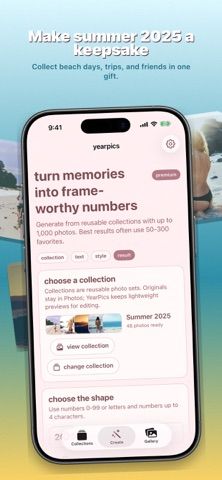
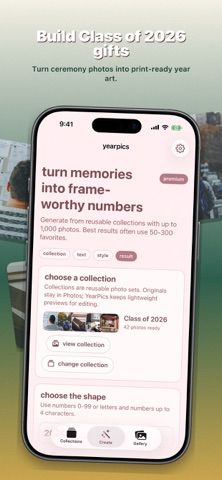
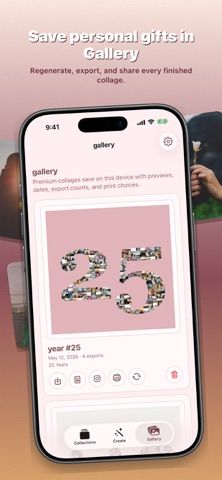
YearPics Photo Collage turns selected photos into a mosaic shaped like an age, year, or short word. Users can save reusable local photo collections, adjust font style, tile size, photo density, and background, and regenerate a design before exporting or sharing it. The app is suited to birthday posters, anniversaries, graduations, family milestones, and other keepsakes. Premium adds larger photo sets, high-resolution PNG and PDF exports, print preparation, Instagram sharing, automatic gallery saves, and short Memory Reveal videos. The developer says selected images are processed on the device and originals are not uploaded by YearPics; it may request photos from iCloud through Apple Photos and stores collection references, thumbnails, collages, and print choices locally. Its description also says a few anonymous events can be counted and disabled in Settings, while the App Store privacy label says no data is collected; Apple has not verified that label. The US App Store lists Premium at $14.99 yearly or $24.99 Lifetime. The app requires iOS 26.0 or iPadOS 26.0 or later, so check compatibility before downloading. Print-ready output depends on source-photo quality and selected layout.

YearPics Photo Collage
Arrange selected photos into number- or word-shaped collages, then create a printable keepsake or a short Memory Reveal video.
Overview
A closer look at YearPics Photo Collage.
A closer look
App screenshots
Choose with confidence
The useful details.
What it does
- Build a photo mosaic in the shape of a number, year, or short text for a personal keepsake.
- Save reusable photo collections and adjust font, tile size, photo density, and background.
- Create a short vertical Memory Reveal video from a completed collage and share through the iOS share sheet.
- Export high-resolution PNG or PDF files and prepare artwork for common frame sizes with Premium.
- Keep selected photos and generated collages processed locally, with no account required.
A good fit for
- People making birthday, anniversary, graduation, or family milestone photo posters.
- Users who want a photo-mosaic keepsake they can export, print, or share as a short video.
Worth knowing
- Requires iOS 26.0 or iPadOS 26.0 or later.
- The US App Store lists Premium at $14.99 yearly or $24.99 Lifetime; larger photo sets and several export and sharing features are paid.
- The developer says selected photos are processed locally and not uploaded by YearPics, but Apple Photos may download iCloud originals while preparing a collage. Review iCloud Photos settings if local storage or downloads matter.
- The app description says it can count a few anonymous events and lets users turn this off, while the App Store privacy label says no data is collected. Apple has not verified the label.
- A print-quality collage depends on image resolution, photo selection, and the chosen tile density; the app does not guarantee printer or frame results.
Frequently asked questions
Answers based on the app’s official listing and reviewed information.
What kind of collage can YearPics make?
It arranges selected photos into the shape of a number, year, or short word, such as a birthday age or graduation year.
Can I change the collage layout?
Yes. You can adjust font style, tile size, photo density, and background, then regenerate the design.
Can I make a video from a collage?
The app includes a Memory Reveal video feature for a completed collage; Premium unlocks video creation and sharing features.
How much does YearPics Premium cost?
The US App Store lists a yearly plan for $14.99 and a one-time Lifetime purchase for $24.99.
Are my photos uploaded?
The developer says selected photos are processed on the device and not uploaded by YearPics. Apple Photos may download iCloud originals while a collage is being prepared.
Which iOS versions are supported?
The App Store requires iOS 26.0 or later on iPhone and iPadOS 26.0 or later on iPad.
Researched from official sources; this is not a hands-on review. Last checked 2026-11-13.
Keep exploring
More apps that might be a good fit.

SketchArt: AR Draw & Trace
An augmented-reality drawing app for tracing reference images, following lessons, and practicing sketching by hand.

RoomSketch3D Floor Plan Maker
A measured floor-plan and home-design app for laying out rooms, furnishing them to scale, and exploring designs in 3D.

My Garden — Planner
A garden planner and plant-care journal for arranging beds, scheduling seasonal tasks, tracking seeds, and recording growth.