GreatoolyGreatooly
aWallet Cloud Password Manager app icon

aWallet Cloud Password Manager

Store passwords and other private records in an encrypted vault, with optional Dropbox or Google Drive sync, biometric unlock, and a password generator.

By Petr SynekApp Store rating 4.9 (1,933)Official store informationPublished 2026/11/03Checked 2026-11-03

Overview

A closer look at aWallet Cloud Password Manager.

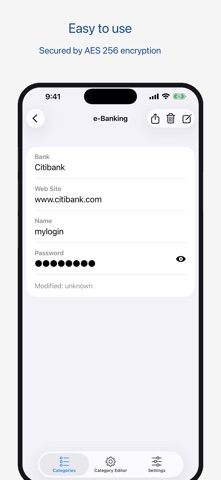
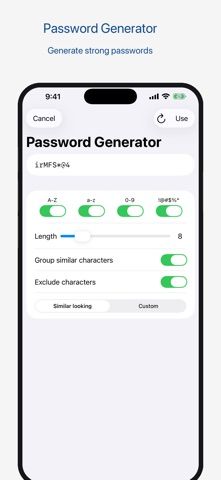
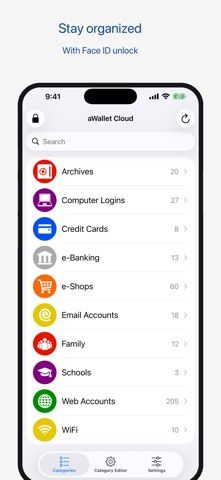
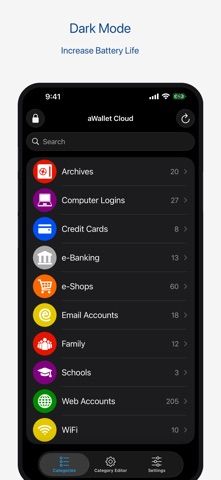
aWallet is a password and information manager for credentials, payment details, and custom records. The app stores entries in an encrypted data file and supports categories, search, and an auto-lock timer. The developer describes AES or Blowfish encryption options and includes Face ID or Touch ID unlock and a password generator.

The US App Store currently lists a US$9.99 paid download, described by the developer as a one-time purchase. Encrypted vault files can be synced through Dropbox or Google Drive, or backed up through file sharing. The app also supports CSV export, but the listing warns that exported CSV data is unencrypted.

This page reports the developer's security claims rather than an independent security review. Password managers hold sensitive information, so use a strong master password and treat exported files as exposed until securely deleted. We have not audited encryption, backups, or account recovery.
A closer look

App screenshots

aWallet Cloud Password Manager official iOS screenshot 1aWallet Cloud Password Manager official iOS screenshot 2Official iOS store screenshotOfficial iOS store screenshot

Choose with confidence

The useful details.

What it does

  • Store passwords, payment details, and custom records in an encrypted vault
  • Organize entries into categories and search their fields
  • Use biometric unlock, auto-lock, and a password generator
  • Back up or sync encrypted files through supported services

A good fit for

  • People who want an offline-first vault for passwords and custom private records

Worth knowing

  • The US listing shows a US$9.99 paid download; regional prices can differ.
  • CSV export is unencrypted and should be handled as sensitive data.
  • Encryption and backup claims come from the developer and have not been independently audited here.

Frequently asked questions

Answers based on the app’s official listing and reviewed information.

What is aWallet Cloud Password Manager used for?

Store passwords and other private records in an encrypted vault, with optional Dropbox or Google Drive sync, biometric unlock, and a password generator.

What can you do with aWallet Cloud Password Manager?

Store passwords, payment details, and custom records in an encrypted vault Organize entries into categories and search their fields Use biometric unlock, auto-lock, and a password generator Back up or sync encrypted files through supported services

Who is aWallet Cloud Password Manager designed for?

People who want an offline-first vault for passwords and custom private records

What should you know before downloading aWallet Cloud Password Manager?

The US listing shows a US$9.99 paid download; regional prices can differ. CSV export is unencrypted and should be handled as sensitive data. Encryption and backup claims come from the developer and have not been independently audited here.

Does aWallet Cloud Password Manager include paid features?

The reviewed listing reports no in-app purchases.

Which platforms support aWallet Cloud Password Manager?

Greatooly's reviewed app information lists iOS.

Researched from official sources; this is not a hands-on review. Last checked 2026-11-03.

Keep exploring

More apps that might be a good fit.

FaveNest – Visual Bookmarks

FaveNest saves links, notes, files, screenshots, and places into a searchable visual library that syncs through private iCloud.

Markdown Studio Pro

Markdown Studio Pro edits portable Markdown files with source and live-preview modes, folder workspaces, themes, and export tools.

Family Organizer: FamHead

FamHead is a family organizer for shared tasks, grocery lists, household decisions, reminders, widgets, and home inventory.