
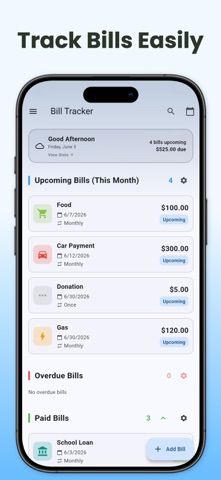
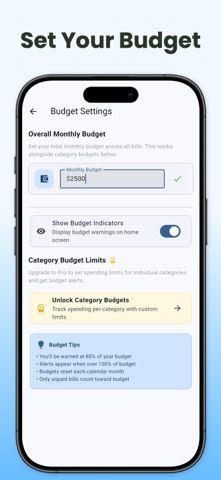
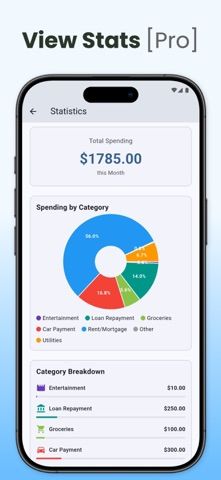
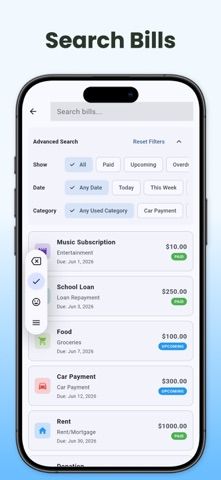
Bill Tracker and Reminder helps keep recurring expenses, utilities, and digital subscriptions organized. Add a bill with its amount, frequency, category, and notes, then mark it paid and review the record later. The app supports one-time and recurring payments, multiple currencies, a secure dashboard, and backup and restore tools. Its developer says payment data is stored locally and that no account or internet connection is needed for basic use; optional cloud backups are available. Pro adds custom reminders, spending insights, category budgets, receipt or invoice attachments, and expanded analytics. Apple lists the app as iPhone-only and requires iOS 17.6 or later. The US store lists a $1.99 yearly Pro plan and a $9.99 lifetime option; review notification permissions and privacy details before relying on reminders or backup.

Bill Tracker and Reminder
An iPhone bill tracker with recurring schedules, custom reminders, payment history, monthly spending charts, backup, and Pro exports.
Overview
A closer look at Bill Tracker and Reminder.
A closer look
App screenshots
Choose with confidence
The useful details.
What it does
- Track bills and subscriptions with custom payment frequencies and categories.
- Keep a history of payments and add notes to bill records.
- View monthly, quarterly, and annual spending insights with Pro.
- Set custom reminders, category budgets, and attach receipts or invoices with Pro.
- Back up and restore data, with optional cloud backup according to the developer.
A good fit for
- iPhone users who want to organize bills, subscriptions, and payment history.
- People who want manual bill tracking with reminders and multiple currency support.
- Users who want optional reports, document attachments, or custom budgets.
Worth knowing
- Requires iOS 17.6 or later and is listed for iPhone.
- Bills and payment status are user-managed; no automatic bank connection or bill payment is advertised.
- Custom reminders and advanced insights are Pro features, and notifications require permission and correct device settings.
- Apple’s listing shows a $1.99 yearly plan and a $9.99 lifetime purchase; price and availability can vary by storefront.
Frequently asked questions
Answers based on the app’s official listing and reviewed information.
What does Bill Tracker and Reminder organize?
It tracks recurring expenses, utilities, subscriptions, one-time bills, categories, and payment notes.
Can the app remind me about due bills?
Yes. Pro includes custom payment reminders. Allow notifications and check the app’s reminder settings so alerts can arrive.
Does Bill Tracker support backups?
The listing describes manual backup and import/export, and the developer also mentions optional cloud backups.
Does it connect to a bank or pay bills?
The listing describes manual bill tracking and does not advertise a bank connection or payment processing.
What does Bill Tracker Pro cost?
The US App Store lists a $1.99 yearly plan and a $9.99 lifetime purchase.
Which devices support Bill Tracker and Reminder?
Apple lists it as an iPhone-only app requiring iOS 17.6 or later.
Researched from official sources; this is not a hands-on review. Last checked 2026-11-19.
Keep exploring
More apps that might be a good fit.

Personal Ledger: Pro Finance
An offline double-entry ledger for tracking net worth, assets, liabilities, income, expenses, cash flow, and debts.

my expenses simplified
A basic personal expense tracker with receipt attachments, spending summaries, category budgets, trend charts, and detailed transaction notes.

Kesef: Expense Tracker
An offline expense and budget tracker with voice entry, recurring transactions, multi-currency records, and shared bill splitting.