
Personal Ledger applies double-entry bookkeeping to personal finances. Record transactions that balance assets and liabilities, then review a net-worth balance sheet, income statement, cash flow, and trends. It can track cash, investments, real estate, and debts, including money owed to or by you. The developer describes the app as offline-first and says financial records remain on the device without servers or tracking. The U.S. App Store lists a free download with a $3.99 Pro lifetime purchase. The Pro feature list includes custom business categories, according to version notes. It requires iOS 26 or later; Apple also lists iPad support and compatible Mac availability. This is a manually maintained ledger, not a bank feed or accounting service, so reconcile entries against statements and keep a backup of records you need to preserve.

Personal Ledger: Pro Finance
An offline double-entry ledger for tracking net worth, assets, liabilities, income, expenses, cash flow, and debts.
Overview
A closer look at Personal Ledger: Pro Finance.
A closer look
App screenshots
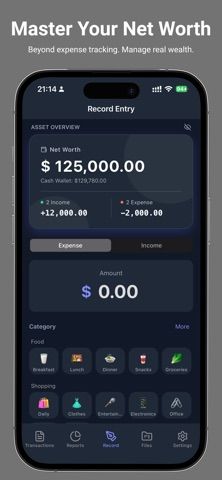
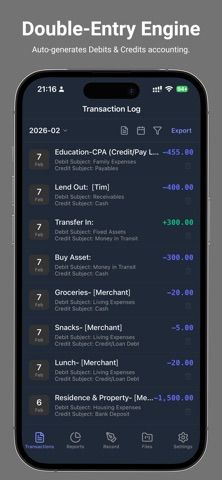
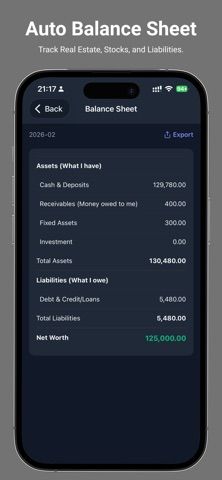
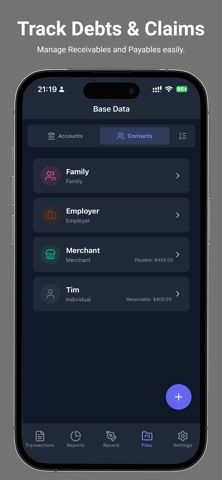
Choose with confidence
The useful details.
What it does
- Use double-entry records for transactions across assets and liabilities.
- Review net worth with balance sheet, income statement, cash flow, and trend reports.
- Track assets, debts, accounts receivable, and accounts payable in one ledger.
- Work offline without an account or server sync, according to the developer.
A good fit for
- People who want structured double-entry bookkeeping instead of a simple spending log.
- Users who want a local ledger for net worth, assets, liabilities, and debts.
Worth knowing
- Requires iOS 26 or later; check device compatibility before installing.
- The developer says data stays on the device, so arrange a backup or export if you need to move records to another device.
- Transactions are entered into the ledger; the listing does not describe automatic bank feeds.
- Double-entry reports are only as accurate as the transactions and opening balances you enter.
Frequently asked questions
Answers based on the app’s official listing and reviewed information.
What is Personal Ledger?
It is a personal finance ledger that uses double-entry bookkeeping to track assets, liabilities, income, expenses, and net worth.
Which reports does it provide?
The listing describes a balance sheet, income statement, cash-flow report, and trend analysis.
Can Personal Ledger work offline?
Yes. The developer describes it as offline-first and says financial data stays on the device.
Does it automatically sync with my bank?
The listing describes manual bookkeeping and does not advertise automatic bank feeds.
How much does Pro cost?
The U.S. App Store lists a one-time Pro Lifetime purchase for $3.99.
What software does Personal Ledger require?
The current U.S. App Store listing requires iOS 26 or later on iPhone or iPad.
Researched from official sources; this is not a hands-on review. Last checked 2026-11-19.
Keep exploring
More apps that might be a good fit.

my expenses simplified
A basic personal expense tracker with receipt attachments, spending summaries, category budgets, trend charts, and detailed transaction notes.

Kesef: Expense Tracker
An offline expense and budget tracker with voice entry, recurring transactions, multi-currency records, and shared bill splitting.
Bill Reminder: DueDay Tracker
An offline bill and subscription reminder for recurring payments, one-time bills, due dates, and monthly spending overviews.