
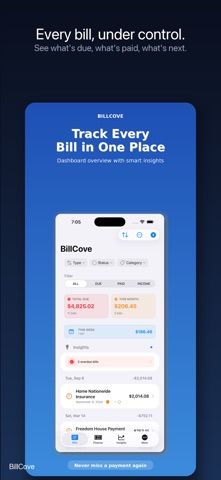
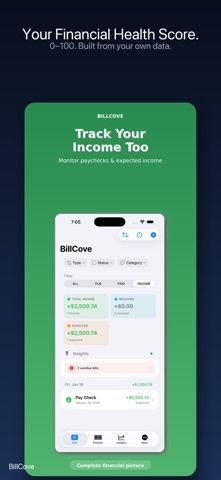
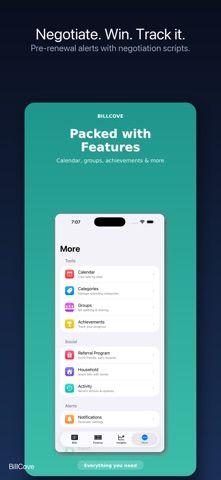
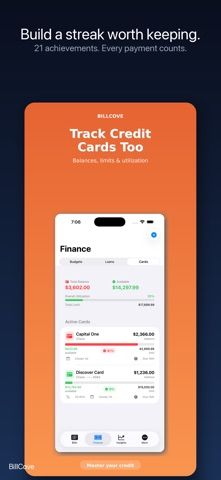
BillCove tracks recurring bills, subscriptions, everyday expenses, credit cards, loans, and category budgets without linking a bank account. Add due dates and reminders, mark payments, attach receipts and notes, view spending patterns, and track loan balances and payoff progress. Premium adds unlimited entries, receipt OCR, exports, advanced analytics, expense-splitting groups, and support. The U.S. App Store lists a seven-day trial followed by $4.99 monthly or $39.99 yearly; the trial converts automatically unless canceled at least 24 hours before it ends. The developer says records are stored locally with optional iCloud sync, and Apple’s privacy label says no data is collected. It requires iOS 17.6 or later, with Mac and Vision Pro support listed. OCR and payoff calculations are planning aids; confirm extracted values and loan terms against source statements.

BillCove: Bill Tracker
A bill and expense manager with due-date reminders, budgets, card and loan tracking, receipt scanning, and optional iCloud sync.
Overview
A closer look at BillCove: Bill Tracker.
A closer look
App screenshots
Choose with confidence
The useful details.
What it does
- Track bills, subscriptions, expenses, and upcoming due dates with reminders.
- Set category budgets, record credit-card balances and payments, and monitor loan payoff progress.
- Scan receipts, attach notes, and export records to CSV or JSON with Premium.
- Use local storage with optional iCloud sync across supported Apple devices.
A good fit for
- People who want bill reminders and budget tracking without connecting a bank.
- Users who want receipts, card and loan tracking, and an Apple ecosystem app.
Worth knowing
- The seven-day trial automatically converts to a paid plan unless canceled at least 24 hours before it ends.
- The U.S. listing shows $4.99 monthly or $39.99 yearly after the trial; confirm the amount and renewal date before starting.
- Requires iOS 17.6 or later; Mac and Vision Pro require their own minimum operating-system versions.
- Receipt OCR and debt payoff estimates can be wrong if details or interest terms are incomplete; verify against statements.
Frequently asked questions
Answers based on the app’s official listing and reviewed information.
What does BillCove track?
It tracks upcoming bills, subscriptions, expenses, category budgets, credit-card balances, payments, and loans.
Does BillCove connect to my bank?
No bank connection is required. You record bills and financial details in the app.
Can BillCove remind me before a bill is due?
Yes. You can track due dates and receive reminders before bills are due.
What happens after the free trial?
The seven-day App Store trial converts to BillCove Premium unless canceled at least 24 hours before it ends.
How much is BillCove Premium?
The U.S. listing shows $4.99 monthly or $39.99 yearly after the free trial. Confirm the offer in your App Store account.
Where does BillCove store financial records?
The developer says records are stored locally, with optional iCloud sync. Apple’s privacy label says no data is collected.
Researched from official sources; this is not a hands-on review. Last checked 2026-11-19.
Keep exploring
More apps that might be a good fit.
Personal Ledger: Pro Finance
An offline double-entry ledger for tracking net worth, assets, liabilities, income, expenses, cash flow, and debts.

my expenses simplified
A basic personal expense tracker with receipt attachments, spending summaries, category budgets, trend charts, and detailed transaction notes.

Kesef: Expense Tracker
An offline expense and budget tracker with voice entry, recurring transactions, multi-currency records, and shared bill splitting.