
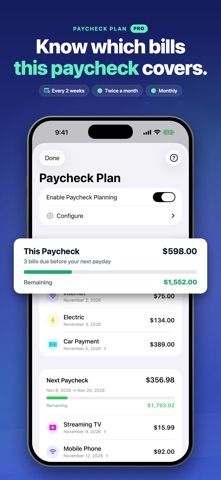
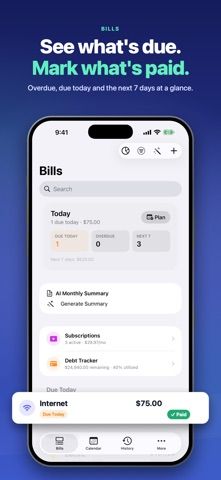
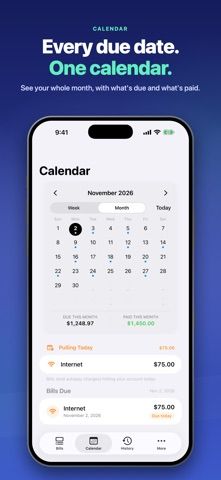
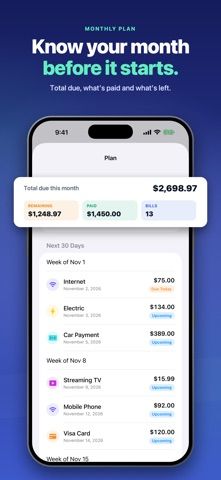
Bills Due Tracker groups household bills by paycheck period so you can see what each pay cycle needs to cover and what may remain. Add rent, utilities, subscriptions, loans, and autopay bills; view upcoming, overdue, and paid items in a calendar; and receive reminders before due dates. Pro can scan a paper bill or screenshot to extract the biller, amount, and date on device, then asks you to review the details before saving. The free version includes up to 12 bills and two custom categories; Pro is a $9.99 one-time purchase in the U.S. store and adds unlimited bills, expanded paycheck planning, debt tracking, multiple reminders, and export. The developer says the scanned image is not saved or sent, and Apple reports no data collected. It requires iOS 18.5 or later on iPhone.

Bills Due Tracker: Reminders
A bill reminder and paycheck planner with due-date calendar, recurring payment tracking, bill scanning, debt payoff, and CSV export.
Overview
A closer look at Bills Due Tracker: Reminders.
A closer look
App screenshots
Choose with confidence
The useful details.
What it does
- Group upcoming bills by weekly, biweekly, semimonthly, or monthly pay periods.
- Receive due-date reminders and review overdue, due today, and upcoming bills.
- Scan bill images on device with Pro and review the extracted details before saving.
- Track debt balances, credit utilization, payment history, subscriptions, and CSV exports with Pro.
A good fit for
- People who plan household bills around their paychecks and want reminders.
- Users who want one-time access to bill scanning, debt tracking, and export tools.
Worth knowing
- The free version is limited to 12 bills and two custom categories; Pro costs $9.99 one time in the U.S. listing.
- Requires iOS 18.5 or later and is listed for iPhone.
- OCR can misread a bill; check the amount, due date, and biller before saving.
- It does not link to a bank or make payments; bill tracking and payment confirmation are manual.
Frequently asked questions
Answers based on the app’s official listing and reviewed information.
What does Bills Due Tracker do?
It tracks bills, subscriptions, due dates, payment history, and paycheck periods in one planner.
Can it group bills by payday?
Yes. The planner can organize bills into weekly, biweekly, twice-monthly, or monthly pay periods.
Can Bills Due Tracker scan a paper bill?
Pro can read the amount, due date, and biller from a photo or screenshot on the iPhone. Review those values before saving.
What is included for free?
The free version includes up to 12 bills and two custom categories. Pro unlocks additional tracking tools.
How much does Pro cost?
The U.S. App Store lists a one-time Pro Unlock for $9.99, with no recurring subscription.
Are bill photos uploaded?
The developer says bill images are not saved or sent anywhere. Apple’s privacy label says no data is collected.
Researched from official sources; this is not a hands-on review. Last checked 2026-11-19.
Keep exploring
More apps that might be a good fit.

Personal Ledger: Pro Finance
An offline double-entry ledger for tracking net worth, assets, liabilities, income, expenses, cash flow, and debts.

my expenses simplified
A basic personal expense tracker with receipt attachments, spending summaries, category budgets, trend charts, and detailed transaction notes.

Kesef: Expense Tracker
An offline expense and budget tracker with voice entry, recurring transactions, multi-currency records, and shared bill splitting.