
BillSense helps organize household bills, subscriptions, rent, utilities, insurance, and loan payments in one place. Add a payment manually or use Smart Add to describe it in plain language; on supported devices, the listing says this parsing runs on-device with Apple Intelligence. Recurring schedules can be monthly, quarterly, or annual, and reminders help surface upcoming due dates. Payment history, predictive views of upcoming obligations, category organization, and CSV export add basic planning and recordkeeping. The developer describes the app as private and local, without bank connections or automated account pulls. Apple lists monthly and annual Premium offers in the US store. BillSense requires iOS 26.1 or later on iPhone or iPad.

BillSense: Bill Reminder
A private bill organizer with recurring schedules, due-date reminders, payment history, cash-flow views, and CSV export.
By Palson Labs LLCReleased 2026/01/23App Store rating 5.0 (1)Official store informationPublished 2026/11/19Checked 2026-11-19
Overview
A closer look at BillSense: Bill Reminder.
A closer look
App screenshots
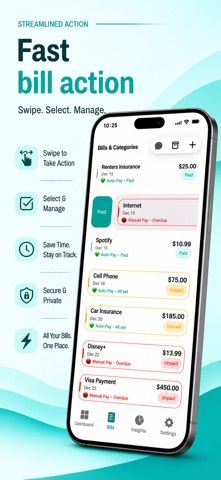
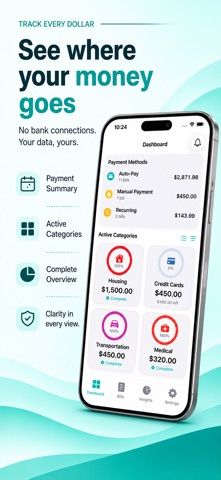
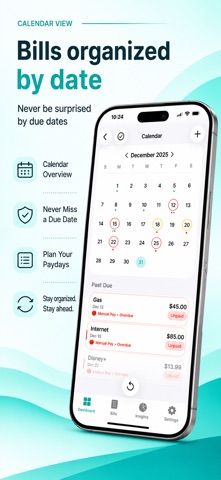
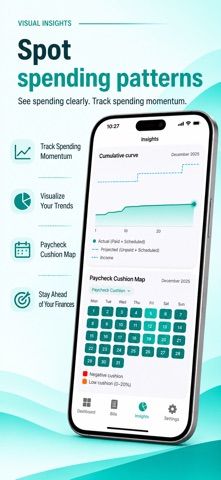
Choose with confidence
The useful details.
What it does
- Add bills using natural-language Smart Add on supported Apple Intelligence devices.
- Track one-time and recurring payments with monthly, quarterly, or annual schedules.
- Set due-date reminders and organize bills by category.
- Review payment history and upcoming obligations with financial overview screens.
- Export bill records as CSV for external recordkeeping.
A good fit for
- People who want reminders for bills and subscriptions without connecting a bank account.
- Users who want a single list of recurring household payments and payment history.
- People who prefer local bill records and CSV export.
Worth knowing
- Requires iOS 26.1 or later on iPhone or iPad.
- It is a manual bill organizer and does not pull transactions from bank accounts.
- Smart Add using Apple Intelligence requires supported hardware; the listing specifies iPhone 15 Pro or newer for that feature.
- Premium features require a paid plan; prices and availability may vary by storefront.
Frequently asked questions
Answers based on the app’s official listing and reviewed information.
What does BillSense help organize?
It tracks household bills, subscriptions, rent, utilities, insurance, loans, and other one-time or recurring payments.
Can BillSense remind me before a bill is due?
Yes. You can set payment reminders for upcoming due dates.
Which recurring schedules are supported?
The listing describes monthly, quarterly, and annual recurring bills.
Does it connect to my bank?
No bank connection or automated account pull is advertised; you add and manage bill information in the app.
How much does BillSense Premium cost?
The US App Store lists Premium at $2.99 monthly or $19.99 annually. Confirm the current offer in your storefront.
Which devices can run BillSense?
Apple lists iOS 26.1 or later for iPhone and iPad. Smart Add with Apple Intelligence requires supported hardware, including iPhone 15 Pro or newer.
Researched from official sources; this is not a hands-on review. Last checked 2026-11-19.
Keep exploring
More apps that might be a good fit.

Safe to Spend: Cash Flow
Safe to Spend: Cash Flow is an iPhone app for cash-flow forecasting. It is listed by Klover Holdings, Inc. in the U.S. App Store.
Personal Ledger: Pro Finance
An offline double-entry ledger for tracking net worth, assets, liabilities, income, expenses, cash flow, and debts.
my expenses simplified
A basic personal expense tracker with receipt attachments, spending summaries, category budgets, trend charts, and detailed transaction notes.