
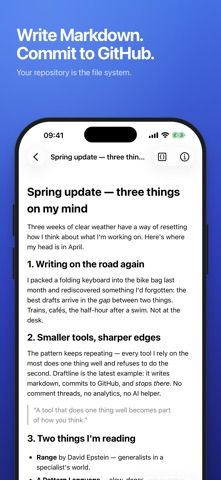
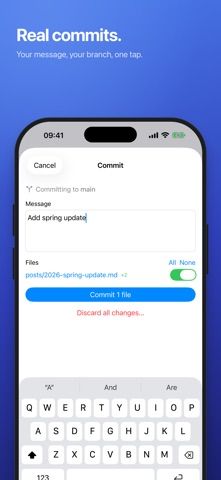
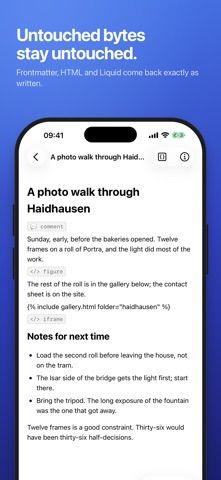
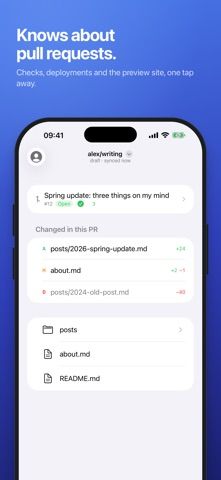
Draftline is a repository-based Markdown editor for people who publish or maintain content in GitHub. Open a repository and branch, edit a file in a native editor, and commit when the change is ready. The developer says text the user does not touch is preserved byte-for-byte, including front matter, raw HTML, and template syntax that the editor does not render. Draftline also caches the last repository and open file for offline editing, then waits to sync until a connection returns. It can show branch pull requests, checks, deployments, and preview sites. Sign-in uses the Draftline GitHub App or a fine-grained personal access token stored in the system Keychain. This workflow is intended for GitHub-backed blogs, documentation, and notes rather than general cloud documents.

Draftline - Markdown Editor
Draftline is a Markdown editor for GitHub repositories. Users can open a repository and branch, edit files on iPhone, iPad, or Mac, and commit changes back to GitHub. It preserves unedited bytes and supports offline work from a local cache. Sign-in uses the Draftline GitHub App or a fine-grained token.
Overview
A closer look at Draftline - Markdown Editor.
A closer look
App screenshots
Choose with confidence
The useful details.
What it does
- Edit Markdown files directly in GitHub repositories
- Preserve unedited content and commit changes to a selected branch
- Offline editing from a cached repository
- View branch pull requests, checks, deployments, and previews
A good fit for
- Writers and developers maintaining GitHub-backed sites or documentation
- People who want to edit repository files from iPhone, iPad, or Mac
Worth knowing
- Requires a GitHub repository and authorization; it is not a general-purpose document editor.
Frequently asked questions
Answers based on the app’s official listing and reviewed information.
What is Draftline - Markdown Editor used for?
Draftline is a Markdown editor for GitHub repositories. Users can open a repository and branch, edit files on iPhone, iPad, or Mac, and commit changes back to GitHub. It preserves unedited bytes and supports offline work from a local cache. Sign-in uses the Draftline GitHub App or a fine-grained token.
What can you do with Draftline - Markdown Editor?
Edit Markdown files directly in GitHub repositories Preserve unedited content and commit changes to a selected branch Offline editing from a cached repository View branch pull requests, checks, deployments, and previews
Who is Draftline - Markdown Editor designed for?
Writers and developers maintaining GitHub-backed sites or documentation People who want to edit repository files from iPhone, iPad, or Mac
What should you know before downloading Draftline - Markdown Editor?
Requires a GitHub repository and authorization; it is not a general-purpose document editor.
Does Draftline - Markdown Editor include paid features?
The reviewed listing does not confirm current in-app purchase options.
Which platforms support Draftline - Markdown Editor?
Greatooly's reviewed app information lists iOS.
Researched from official sources; this is not a hands-on review. Last checked 2026-11-04.
Keep exploring
More apps that might be a good fit.

FaveNest – Visual Bookmarks
FaveNest saves links, notes, files, screenshots, and places into a searchable visual library that syncs through private iCloud.
Markdown Studio Pro
Markdown Studio Pro edits portable Markdown files with source and live-preview modes, folder workspaces, themes, and export tools.

Family Organizer: FamHead
FamHead is a family organizer for shared tasks, grocery lists, household decisions, reminders, widgets, and home inventory.