
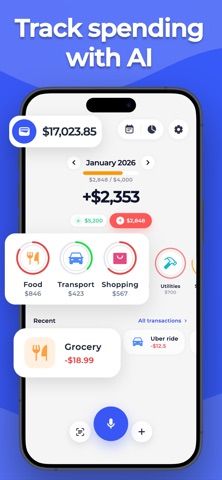
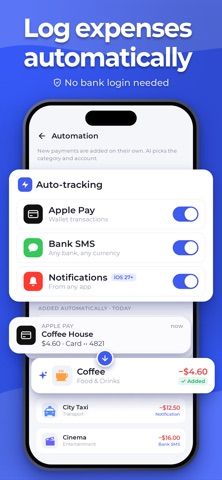
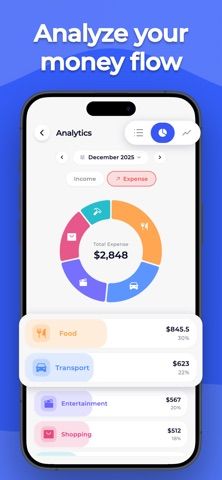
Expense Tracker: Budget AI combines everyday transaction tracking with voice entry, receipt scanning, automatic categorization, and budget planning. Users can enter one transaction or process several at once, then review history, filters, analytics, and daily or weekly spending allowances. Categories can use rules, and the app supports recurring or planned transactions, multiple account currencies, and transfers between accounts. Apple’s listing says no authorization is required, but its privacy label reports financial information, user content, contact details, identifiers, diagnostics, and some data used for tracking or advertising. The listing does not make the processing destination for every voice or receipt feature clear, so review the privacy policy before adding sensitive records. The app is free to download with monthly and yearly subscriptions and requires iOS 16.0 or later.

Expense Tracker: Budget AI
An AI-assisted expense and income manager with voice and receipt entry, category rules, budgets, recurring transactions, and analytics.
Overview
A closer look at Expense Tracker: Budget AI.
A closer look
App screenshots

Choose with confidence
The useful details.
What it does
- Record income and expenses manually, by voice, or by scanning receipts and images.
- Enter multiple transactions at once and review AI-suggested categories before saving.
- Set budgets and daily or weekly spending allowances.
- Search and filter transaction history and view spending analytics.
- Track recurring or planned transactions across accounts and more than 170 currencies.
A good fit for
- People who want voice, receipt, and manual ways to record expenses.
- Users who want budget allowances and analytics with multiple account currencies.
- People willing to review privacy terms for an app that handles financial records and user content.
Worth knowing
- Requires iOS 16.0 or later and is listed for iPhone.
- Apple’s privacy label includes financial information, user content, contact details, identifiers, and diagnostics; some data may be used for tracking or advertising.
- The listing does not clearly describe where every voice or receipt scan is processed; check the privacy policy before sharing sensitive records.
- Premium access requires a subscription, and recognized entries should be reviewed for accuracy.
Frequently asked questions
Answers based on the app’s official listing and reviewed information.
What can Budget AI track?
It tracks income and expenses, supports budgets and allowances, and provides history and analytics.
Can it scan receipts or accept voice entries?
Yes. The listing describes voice input and receipt or image scanning, including multiple transactions at once. Review suggested entries before saving.
Does the app support multiple currencies?
The listing says it supports accounts and categories in more than 170 currencies, including cryptocurrency units.
What should I know about its privacy label?
Apple’s label reports financial information, user content, contact details, identifiers, and diagnostics; it also lists some data for tracking or advertising. Review the policy before entering sensitive records.
How much does Budget AI cost?
The US App Store lists a $3.99 monthly subscription and a $24.99 yearly subscription, in addition to the free download.
Which devices support Budget AI?
Apple lists iOS 16.0 or later and marks the app as designed for iPhone.
Researched from official sources; this is not a hands-on review. Last checked 2026-11-19.
Keep exploring
More apps that might be a good fit.

Personal Ledger: Pro Finance
An offline double-entry ledger for tracking net worth, assets, liabilities, income, expenses, cash flow, and debts.

my expenses simplified
A basic personal expense tracker with receipt attachments, spending summaries, category budgets, trend charts, and detailed transaction notes.

Kesef: Expense Tracker
An offline expense and budget tracker with voice entry, recurring transactions, multi-currency records, and shared bill splitting.