
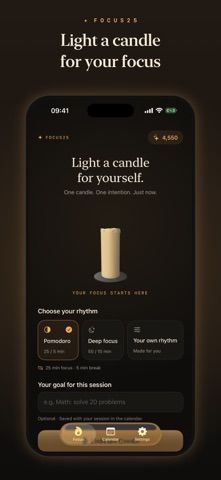
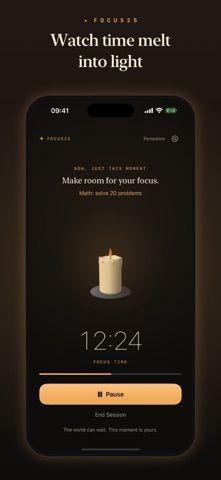
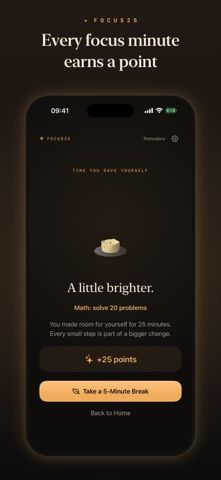
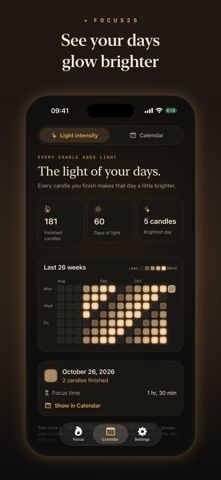
Focus25 is a focus timer built around work sessions and breaks. Its App Store listing describes standard 25/5 and 50/10 intervals, custom session lengths, pause and resume controls, and a timer that can continue while the screen is locked. Each session can include an intention, which is saved alongside the calendar history. The app turns completed sessions into a visual candle and day view, and it also lists Live Activities, Dynamic Island, Home Screen and Lock Screen widgets, and Apple Watch controls. The developer says sessions stay on device and the app has no account, ads, or tracking. It is a timer and reflection tool; it does not manage projects or guarantee productivity outcomes. The listing currently has no user ratings, so there is little public feedback to assess yet.

Focus25: Pomodoro Focus Timer
Use a customizable Pomodoro timer, set one intention per session, and track focused minutes in a visual calendar.
Overview
A closer look at Focus25: Pomodoro Focus Timer.
A closer look
App screenshots
Choose with confidence
The useful details.
What it does
- Run preset Pomodoro or deep-focus intervals, or set custom work and break lengths.
- Attach an intention to a focus session and review completed time in a calendar.
- Use a lock-screen timer, Live Activity, widgets, and Apple Watch controls.
- Choose from sound options or silence, with VoiceOver and Reduce Motion support listed.
A good fit for
- People who want a lightweight timer that helps them record what they planned to focus on.
Worth knowing
- The App Store listing had no user ratings when checked, so independent feedback is limited.
- It tracks focus sessions but is not a task manager or project planning system.
- Confirm current purchase terms and device compatibility in the store before installing.
Frequently asked questions
Answers based on the app’s official listing and reviewed information.
What is Focus25: Pomodoro Focus Timer used for?
Use a customizable Pomodoro timer, set one intention per session, and track focused minutes in a visual calendar.
What can you do with Focus25: Pomodoro Focus Timer?
Run preset Pomodoro or deep-focus intervals, or set custom work and break lengths. Attach an intention to a focus session and review completed time in a calendar. Use a lock-screen timer, Live Activity, widgets, and Apple Watch controls. Choose from sound options or silence, with VoiceOver and Reduce Motion support listed.
Who is Focus25: Pomodoro Focus Timer designed for?
People who want a lightweight timer that helps them record what they planned to focus on.
What should you know before downloading Focus25: Pomodoro Focus Timer?
The App Store listing had no user ratings when checked, so independent feedback is limited. It tracks focus sessions but is not a task manager or project planning system. Confirm current purchase terms and device compatibility in the store before installing.
Does Focus25: Pomodoro Focus Timer include paid features?
The reviewed listing does not confirm current in-app purchase options.
Which platforms support Focus25: Pomodoro Focus Timer?
Greatooly's reviewed app information lists iOS.
Researched from official sources; this is not a hands-on review. Last checked 2026-11-04.
Keep exploring
More apps that might be a good fit.

FaveNest – Visual Bookmarks
FaveNest saves links, notes, files, screenshots, and places into a searchable visual library that syncs through private iCloud.
Markdown Studio Pro
Markdown Studio Pro edits portable Markdown files with source and live-preview modes, folder workspaces, themes, and export tools.

Family Organizer: FamHead
FamHead is a family organizer for shared tasks, grocery lists, household decisions, reminders, widgets, and home inventory.