
Inki: AI Writing Editor lets users draft and revise text inside the document they are working on. AI can continue a draft from the cursor, rewrite selected text, answer questions about structure and wording, or suggest changes that the user reviews as a diff before applying. The app can search the web for context, generate or edit images, organize notes in folders, and attach PDFs, images, or camera photos. Every rewrite is saved as an earlier version that users can revisit. Documents can also be opened on the web or in the Mac app. Inki offers a free plan, but a subscription is required for more AI usage, and an account is required. The listing does not state the subscription price, usage allowance, or billing frequency. The description does not explain how document attachments or AI requests are processed, so users should review the service’s privacy terms before using confidential material.

Inki: AI Writing Editor
Inki edits writing in place with AI drafting, rewrites, document diffs, image generation, folders, and version history.
Overview
A closer look at Inki: AI Writing Editor.
A closer look
App screenshots
Choose with confidence
The useful details.
What it does
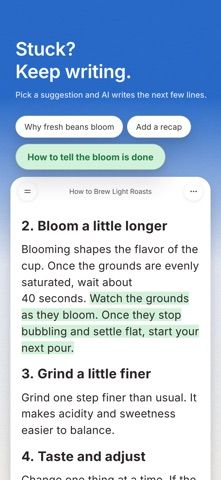
- Draft from the cursor and continue writing without switching between a document and a chat.
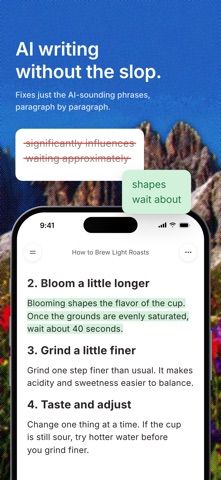
- Rewrite selected text, shorten or expand it, revise wording, or apply Deslop suggestions.
- Review proposed changes as a diff before applying them to the document.
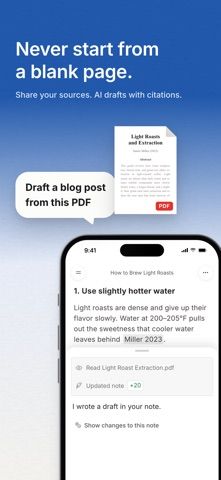
- Attach PDFs, images, or camera photos, search the web, and generate or edit images.
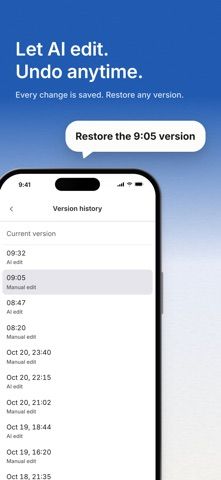
- Organize notes in folders, revisit earlier versions, and continue documents on the web or Mac app.
A good fit for
- Writers who want AI editing and revision tools directly in their documents.
- Users who work with drafts, attachments, and version history across mobile and desktop.
Worth knowing
- A free plan is available, but more AI usage requires a subscription and an account.
- The listing does not state subscription price, billing frequency, or usage limits.
- The listing does not explain how document attachments or AI requests are processed; review privacy terms before using confidential text.
Frequently asked questions
Answers based on the app’s official listing and reviewed information.
What is Inki: AI Writing Editor used for?
Inki edits writing in place with AI drafting, rewrites, document diffs, image generation, folders, and version history.
What can you do with Inki: AI Writing Editor?
Draft from the cursor and continue writing without switching between a document and a chat. Rewrite selected text, shorten or expand it, revise wording, or apply Deslop suggestions. Review proposed changes as a diff before applying them to the document. Attach PDFs, images, or camera photos, search the web, and generate or edit images.
Who is Inki: AI Writing Editor designed for?
Writers who want AI editing and revision tools directly in their documents. Users who work with drafts, attachments, and version history across mobile and desktop.
What should you know before downloading Inki: AI Writing Editor?
A free plan is available, but more AI usage requires a subscription and an account. The listing does not state subscription price, billing frequency, or usage limits. The listing does not explain how document attachments or AI requests are processed; review privacy terms before using confidential text.
What does Inki: AI Writing Editor cost?
Free to download. The app offers a free plan; the listing does not state its included AI usage limit. A subscription is required for more AI usage; current price, billing frequency, and usage limits are not stated in the listing.
Which platforms support Inki: AI Writing Editor?
Greatooly's reviewed app information lists iOS, macOS.
Researched from official sources; this is not a hands-on review. Last checked 2026-11-10.
Keep exploring
More apps that might be a good fit.

FaveNest – Visual Bookmarks
FaveNest saves links, notes, files, screenshots, and places into a searchable visual library that syncs through private iCloud.
Markdown Studio Pro
Markdown Studio Pro edits portable Markdown files with source and live-preview modes, folder workspaces, themes, and export tools.

Family Organizer: FamHead
FamHead is a family organizer for shared tasks, grocery lists, household decisions, reminders, widgets, and home inventory.