
Nooktide is an iPhone calendar planner that lets users describe a task in plain language and choose from suggested time slots. It can offer two or three options with a reason for each, add events by typing or voice, and sync with iCloud, Google, and Outlook calendars. The app also supports habits, weekly focus goals, a morning summary, and a Later list for tasks that are not ready to schedule. The free tier includes one habit and three confirmed plans per week; Pro adds features such as unlimited habits, widgets, Siri, rescheduling, and Apple Intelligence on supported devices. The yearly plan includes a seven-day trial. Nooktide requires iOS 17 or later.

Nooktide: AI Calendar Planner
An AI calendar planner that takes written or spoken tasks and suggests available times across connected calendars.
By OMER AKKUSReleased 2026/10/18No ratings yetOfficial store informationPublished 2026/11/04Checked 2026-11-04
Overview
A closer look at Nooktide: AI Calendar Planner.
A closer look
App screenshots
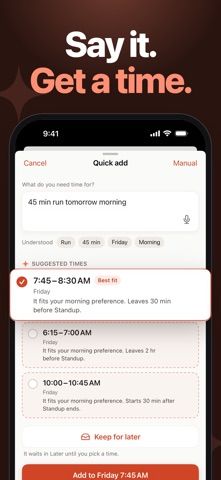
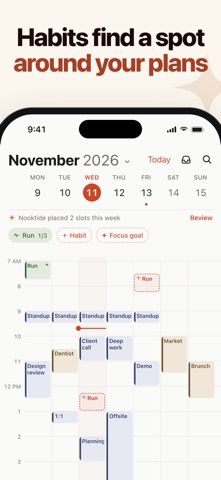
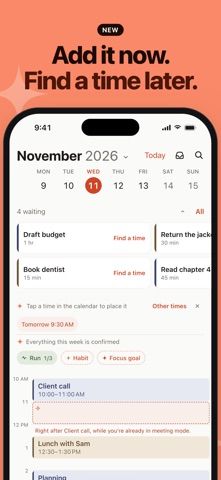
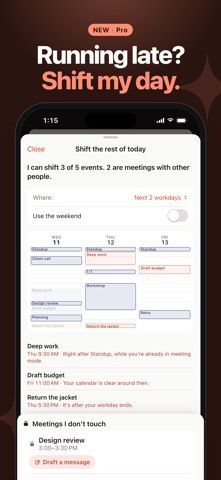
Choose with confidence
The useful details.
What it does
- Create calendar plans by typing or speaking a request in plain language.
- Review suggested time slots and choose the option that fits.
- Sync calendars with iCloud, Google, and Outlook.
- Track weekly habits, keep tasks for later, and use a morning summary.
A good fit for
- People who want help finding time for tasks across their connected calendars.
Worth knowing
- The free tier allows one habit and three confirmed plans per week; more features require Pro.
- Pro is a monthly or yearly subscription; Apple Intelligence requires a supported iPhone with that feature enabled.
Frequently asked questions
Answers based on the app’s official listing and reviewed information.
What is Nooktide: AI Calendar Planner used for?
An AI calendar planner that takes written or spoken tasks and suggests available times across connected calendars.
What can you do with Nooktide: AI Calendar Planner?
Create calendar plans by typing or speaking a request in plain language. Review suggested time slots and choose the option that fits. Sync calendars with iCloud, Google, and Outlook. Track weekly habits, keep tasks for later, and use a morning summary.
Who is Nooktide: AI Calendar Planner designed for?
People who want help finding time for tasks across their connected calendars.
What should you know before downloading Nooktide: AI Calendar Planner?
The free tier allows one habit and three confirmed plans per week; more features require Pro. Pro is a monthly or yearly subscription; Apple Intelligence requires a supported iPhone with that feature enabled.
Does Nooktide: AI Calendar Planner include paid features?
Nooktide Pro is offered monthly or yearly, with a seven-day trial on the yearly plan. Check the App Store for current prices and renewal terms.
Which platforms support Nooktide: AI Calendar Planner?
Greatooly's reviewed app information lists iOS.
Researched from official sources; this is not a hands-on review. Last checked 2026-11-04.
Keep exploring
More apps that might be a good fit.

FaveNest – Visual Bookmarks
FaveNest saves links, notes, files, screenshots, and places into a searchable visual library that syncs through private iCloud.
Markdown Studio Pro
Markdown Studio Pro edits portable Markdown files with source and live-preview modes, folder workspaces, themes, and export tools.

Family Organizer: FamHead
FamHead is a family organizer for shared tasks, grocery lists, household decisions, reminders, widgets, and home inventory.