
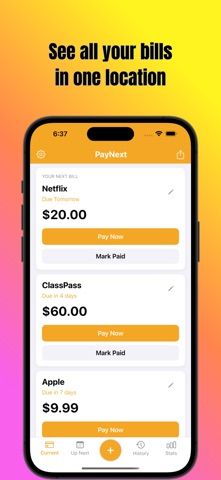
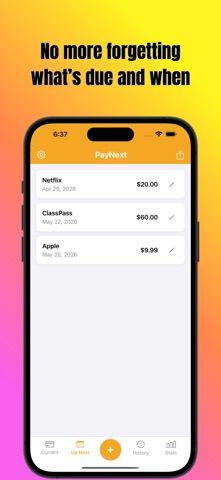
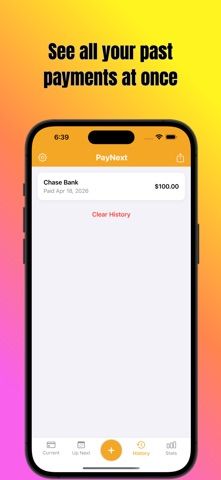
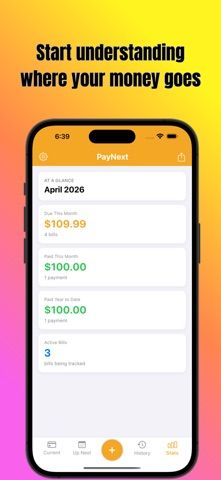
Pay Next keeps the next upcoming bill at the top of the screen and arranges later bills by date. Add subscriptions, utilities, loans, and other regular payments, then mark them paid to build a searchable history with amounts and payees. A calendar view helps you plan the month, while monthly statistics show what is due, what is paid, and how much you have tracked year to date. The developer says the app requires no login, bank link, or subscription and stores records on the device. Apple’s privacy label says no data is collected. The current U.S. listing is free and requires iOS 17 or later on iPhone. Pay Next is a reminder and recordkeeping tool; it does not move money or automatically import payments, so update bill amounts and payment status yourself.
Pay Next: Bill Planner
A lightweight bill tracker for due dates, subscriptions, payment history, and monthly totals, with on-device storage and no account.
Overview
A closer look at Pay Next: Bill Planner.
A closer look
App screenshots
Choose with confidence
The useful details.
What it does
- View the next bill, due date, amount, and upcoming payments by urgency.
- Plan the month with a calendar for subscriptions, utilities, loans, and recurring costs.
- Record bills as paid and review payment history by date and amount.
- See monthly totals, paid amounts, year-to-date spending, and active tracked bills.
A good fit for
- People who want a simple, local list of upcoming bills and payment history.
- Users who do not want an account, bank login, subscription, or a complex budget system.
Worth knowing
- Bills and payments must be entered and marked manually; the app does not automatically sync with a bank.
- The app is limited to bill reminders and records, without a full budget or paycheck planner.
- Requires iOS 17 or later and is listed for iPhone.
Frequently asked questions
Answers based on the app’s official listing and reviewed information.
What does Pay Next help with?
It lists upcoming bills and subscriptions, helps you see their due dates, and stores a history when you mark bills paid.
Can I see bills on a calendar?
Yes. The Up Next tab shows upcoming scheduled bills in a calendar view.
Can Pay Next make payments for me?
No payment processing is described. You can mark a bill as paid after paying it elsewhere.
Does Pay Next connect to a bank?
No. The developer says no bank login or bank synchronization is required.
Does Pay Next require a subscription?
No. The U.S. App Store lists it as free, and the developer says no subscription is required.
Where are Pay Next records stored?
The developer says the data stays on your device, and Apple’s privacy label says no data is collected.
Researched from official sources; this is not a hands-on review. Last checked 2026-11-19.
Keep exploring
More apps that might be a good fit.
Personal Ledger: Pro Finance
An offline double-entry ledger for tracking net worth, assets, liabilities, income, expenses, cash flow, and debts.
my expenses simplified
A basic personal expense tracker with receipt attachments, spending summaries, category budgets, trend charts, and detailed transaction notes.

Kesef: Expense Tracker
An offline expense and budget tracker with voice entry, recurring transactions, multi-currency records, and shared bill splitting.