GreatoolyGreatooly
Planmore: Schedule Planner App app icon

Planmore: Schedule Planner App

Combine calendars, tasks, reminders, notes, and shopping lists in a multi-view planner, with optional lifetime or recurring Premium upgrades.

By Daily Calendar & Planner AppsApp Store rating 4.8 (4,962)Official store informationPublished 2026/11/03Checked 2026-11-03

Overview

A closer look at Planmore: Schedule Planner App.

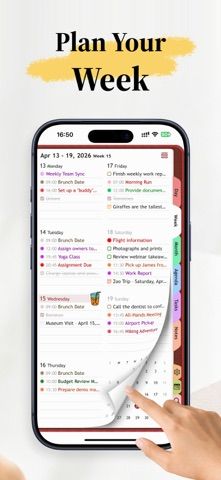
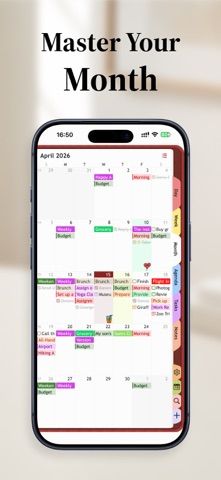
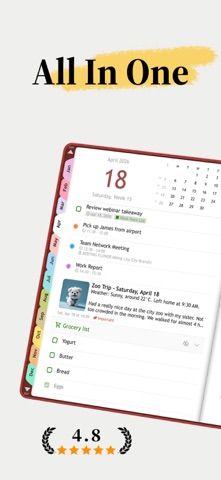
Planmore is an all-in-one schedule planner that combines calendar events, tasks, reminders, and notes. The listing describes day, week, month, and year views, recurring events, priority-based tasks, reminders, and integration with iOS Reminders. Users can also keep shopping lists and export schedule views for different time ranges.

The app supports iCloud synchronization across devices using the same iCloud account. Its listing says advanced features can be unlocked with either a one-time lifetime purchase or a monthly or yearly Premium subscription, but current prices were not stated. The free download gives users a way to explore the planner before upgrading.

Calendar complexity and task behavior can vary across features; test the views and reminders before moving an entire schedule. Sync depends on iCloud settings, and exports should be checked before relying on them as a backup. We have not tested data migration, shared events, or reminder delivery. Planmore is a personal organizer rather than a team project-management system.
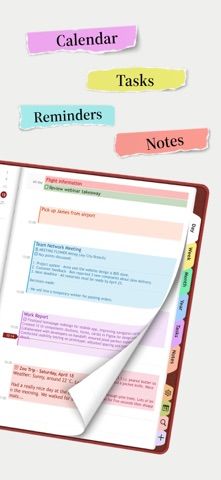
A closer look

App screenshots

Planmore: Schedule Planner App official iOS screenshot 1Planmore: Schedule Planner App official iOS screenshot 2Official iOS store screenshotOfficial iOS store screenshot

Choose with confidence

The useful details.

What it does

  • View events, tasks, reminders, and notes together
  • Plan by day, week, month, or year
  • Create recurring tasks, reminders, and categorized lists
  • Sync through iCloud and upgrade to monthly, yearly, or lifetime access

A good fit for

  • People who want a single planner for calendar events, tasks, reminders, and notes

Worth knowing

  • The listing does not state current Premium or lifetime prices.
  • Cross-device synchronization depends on iCloud and the same Apple account settings.
  • We have not tested import, export, shared events, or notification reliability.

Frequently asked questions

Answers based on the app’s official listing and reviewed information.

What is Planmore: Schedule Planner App used for?

Combine calendars, tasks, reminders, notes, and shopping lists in a multi-view planner, with optional lifetime or recurring Premium upgrades.

What can you do with Planmore: Schedule Planner App?

View events, tasks, reminders, and notes together Plan by day, week, month, or year Create recurring tasks, reminders, and categorized lists Sync through iCloud and upgrade to monthly, yearly, or lifetime access

Who is Planmore: Schedule Planner App designed for?

People who want a single planner for calendar events, tasks, reminders, and notes

What should you know before downloading Planmore: Schedule Planner App?

The listing does not state current Premium or lifetime prices. Cross-device synchronization depends on iCloud and the same Apple account settings. We have not tested import, export, shared events, or notification reliability.

Does Planmore: Schedule Planner App include paid features?

The listing describes an optional one-time lifetime upgrade for advanced features; current price was not stated. Monthly and yearly Premium subscriptions are also listed; current prices and included features should be checked in the App Store.

Which platforms support Planmore: Schedule Planner App?

Greatooly's reviewed app information lists iOS.

Researched from official sources; this is not a hands-on review. Last checked 2026-11-03.

Keep exploring

More apps that might be a good fit.

CleanHaus: Airbnb Turnovers

CleanHaus automates short-term rental turnovers by connecting booking calendars with cleaners, schedules and property tasks.

GoalStar: Daily Goal Tracker

GoalStar makes daily goals visible with a gold-star chart, streaks, reminders, widgets and optional NFC tap tags.

Accessbox - Password Manager

Accessbox stores passwords, passkeys and verification codes in encrypted Accesscards with AutoFill, breach alerts and optional iCloud sync.