
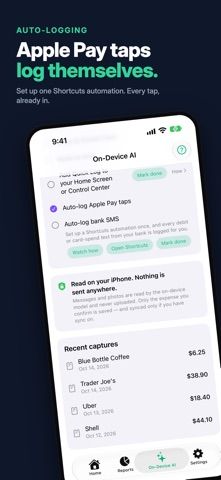
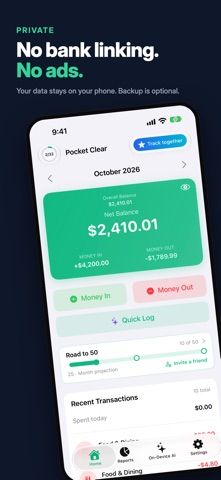
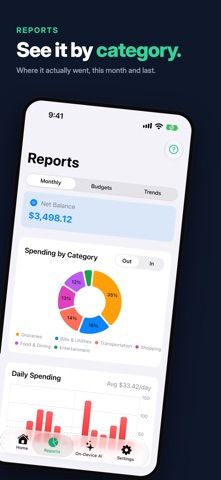
Pocket Clear records money in and money out, then organizes transactions by category, payee, payment method, and the budget period that fits a user’s pay cycle. It can run fully offline without an account, and the developer says data stays on the device unless the user enables cloud backup. Optional on-device tools can help capture Apple Pay activity, bank messages, or shared receipt images through Shortcuts and iPhone features; entries wait for review before they are saved. Reports show category totals and trends, while Pro adds cloud sync, shared views, budgets, savings goals, recurring transactions, receipt attachments, and CSV or PDF export. The US store lists several Pro subscription price rows, including two Monthly amounts, so confirm the offer and eligibility in the purchase screen. Requires iOS 17.0 or later.

Pocket Clear: Expense Tracker
A privacy-focused expense tracker with pay-cycle budgets, optional on-device capture tools, reports, savings goals, and Pro sync features.
Overview
A closer look at Pocket Clear: Expense Tracker.
A closer look
App screenshots
Choose with confidence
The useful details.
What it does
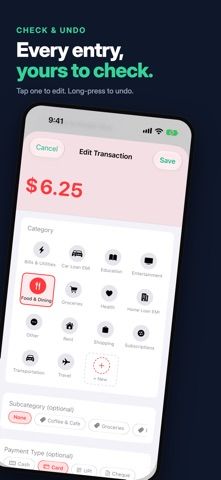
- Record income and expenses with custom categories, subcategories, payees, and split transactions.
- Set a budget period around weekly, fortnightly, semi-monthly, monthly, or yearly pay cycles.
- Review category charts, monthly and yearly trends, balances, and recent captures.
- Use optional on-device capture workflows for Apple Pay activity, bank texts, and shared receipts.
- Unlock Pro tools such as cloud sync, partner sharing, budgets, savings goals, recurring transactions, and CSV/PDF export.
A good fit for
- People who want an expense log that can work offline and follow a non-calendar pay cycle.
- Users who want to review automatically captured entries before saving them.
- Couples, travellers, or expats who need shared expenses or secondary-currency tracking.
Worth knowing
- Requires iOS 17.0 or later on iPhone or iPad.
- The app does not link to a bank; automated capture depends on user-configured Shortcuts or shared content and should be checked for accuracy.
- Cloud backup, shared features, and several budgeting tools are Pro features and require enabling online sync.
- The US App Store shows Monthly Pro at both $0.99 and $4.99 plus Annual Pro at $34.99; confirm which offer applies to the account before purchase.
Frequently asked questions
Answers based on the app’s official listing and reviewed information.
What can I track with Pocket Clear?
It records income and expenses and can organize them by category, payee, payment type, date, and budget period.
Does Pocket Clear connect to my bank?
No bank linking is advertised. Optional captures can use on-device Shortcuts and shared messages or receipts, then wait for you to review them.
Can it work offline?
Yes. The developer says core use works offline and account creation is optional; cloud sync requires enabling the online feature.
Can I set budgets around my payday?
Yes. The app supports several budget periods, including fortnightly and semi-monthly, and lets users choose period boundaries.
How much is Pocket Clear Pro?
The US store lists monthly offers at $0.99 and $4.99 and an annual offer at $34.99. Confirm which monthly offer applies in the app before buying.
What iOS version does Pocket Clear require?
Apple lists iOS 17.0 or later for iPhone and iPad.
Researched from official sources; this is not a hands-on review. Last checked 2026-11-19.
Keep exploring
More apps that might be a good fit.

Personal Ledger: Pro Finance
An offline double-entry ledger for tracking net worth, assets, liabilities, income, expenses, cash flow, and debts.

my expenses simplified
A basic personal expense tracker with receipt attachments, spending summaries, category budgets, trend charts, and detailed transaction notes.

Kesef: Expense Tracker
An offline expense and budget tracker with voice entry, recurring transactions, multi-currency records, and shared bill splitting.