
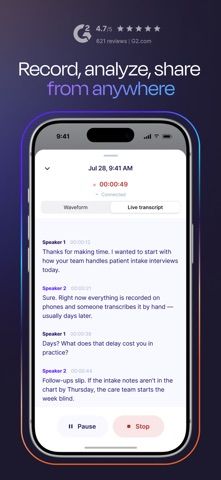
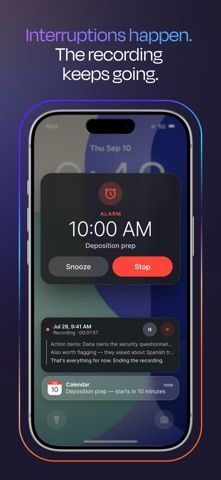
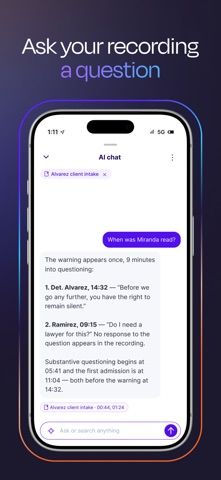
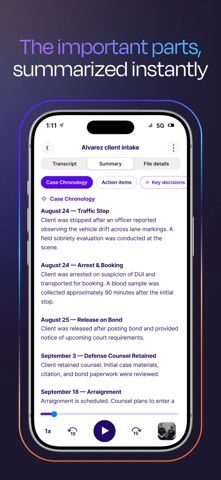
Rev Recorder is designed for people who capture interviews, meetings, and field recordings away from a reliable connection. Recording starts and saves on the device, can continue through interruptions, and uploads when the phone is back online. The listing describes automatic transcripts, speaker labels, summaries, transcript questions, file search, and secure sharing through a Rev account. It also supports audio and video uploads and viewing video beside its transcript. A Rev login is required to access the account and files. Subscription access is mentioned, but the listing does not make the purchase route or current plan prices clear; check Rev's terms before relying on a workflow. Transcription and analysis depend on uploading recordings for processing.

Rev: Recorder & Transcription
An offline-capable mobile recorder that transcribes, organizes, and analyzes interviews after upload.
Overview
A closer look at Rev: Recorder & Transcription.
A closer look
App screenshots
Choose with confidence
The useful details.
What it does
- Record on the phone without a network connection and upload when service returns.
- Generate searchable transcripts with speaker labels, summaries, and questions about transcript content.
- Upload audio or video, review video alongside its transcript, and search recordings by name.
- Share transcripts with a team or limit access to selected people.
A good fit for
- Journalists, researchers, legal teams, and consultants who record interviews or meetings in the field.
Worth knowing
- A Rev account is needed, and uploads are required for transcription and analysis.
- The App Store description does not clearly state the subscription purchase route or current prices; verify account and plan terms with Rev.
Frequently asked questions
Answers based on the app’s official listing and reviewed information.
What is Rev: Recorder & Transcription used for?
An offline-capable mobile recorder that transcribes, organizes, and analyzes interviews after upload.
What can you do with Rev: Recorder & Transcription?
Record on the phone without a network connection and upload when service returns. Generate searchable transcripts with speaker labels, summaries, and questions about transcript content. Upload audio or video, review video alongside its transcript, and search recordings by name. Share transcripts with a team or limit access to selected people.
Who is Rev: Recorder & Transcription designed for?
Journalists, researchers, legal teams, and consultants who record interviews or meetings in the field.
What should you know before downloading Rev: Recorder & Transcription?
A Rev account is needed, and uploads are required for transcription and analysis. The App Store description does not clearly state the subscription purchase route or current prices; verify account and plan terms with Rev.
Does Rev: Recorder & Transcription include paid features?
The reviewed listing does not confirm current in-app purchase options.
Which platforms support Rev: Recorder & Transcription?
Greatooly's reviewed app information lists iOS.
Researched from official sources; this is not a hands-on review. Last checked 2026-11-04.
Keep exploring
More apps that might be a good fit.

FaveNest – Visual Bookmarks
FaveNest saves links, notes, files, screenshots, and places into a searchable visual library that syncs through private iCloud.
Markdown Studio Pro
Markdown Studio Pro edits portable Markdown files with source and live-preview modes, folder workspaces, themes, and export tools.

Family Organizer: FamHead
FamHead is a family organizer for shared tasks, grocery lists, household decisions, reminders, widgets, and home inventory.