
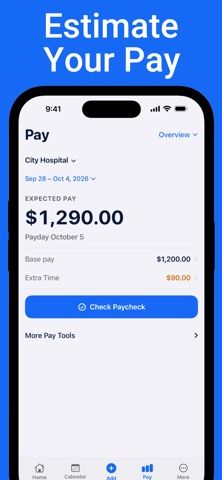
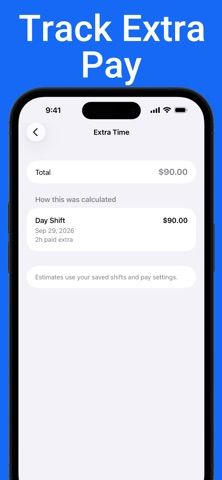
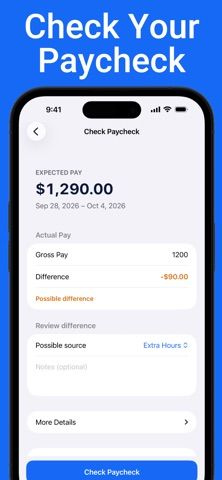
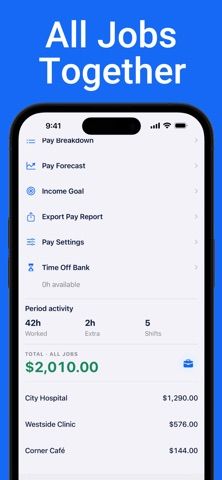
Shift Calendar: Salary Tracker is designed for people working day, evening, overnight, or rotating shifts. Users can view a schedule by month, week, or agenda, add leave and notes, and apply repeating shift patterns. The app also records actual start and finish times, breaks, pay periods, and basic gross-pay estimates. A free version supports schedule entry and basic calculations, while an optional Pro purchase adds multiple workplaces, overtime and premium rules, paycheck comparisons, income forecasts, time-off tracking, and detailed reports. The developer says schedules and pay records are stored locally and can be backed up as a file. Pay figures depend on the rates and rules entered and are estimates; check them against employer records. The listing does not state Pro prices or purchase periods.

Shift Calendar: Salary Tracker
A shift calendar and pay estimator for recording rotating schedules, hours, and expected earnings.
Overview
A closer look at Shift Calendar: Salary Tracker.
A closer look
App screenshots
Choose with confidence
The useful details.
What it does
- View day, evening, night, and rotating shifts in month, week, or agenda views.
- Record actual work hours, breaks, pay periods, leave, and payday reminders.
- Estimate gross pay using entered hours, rates, overtime rules, and premiums.
- Use Pro for multiple workplaces, income forecasts, paycheck comparisons, and detailed reports.
A good fit for
- Shift workers who want a personal work calendar and a basic estimate of upcoming pay.
Worth knowing
- Pay figures are estimates based on information entered by the user; confirm amounts with employer records.
- Advanced overtime, multiple-workplace, and reporting features require Pro.
- The listing does not state Pro pricing or purchase periods.
Frequently asked questions
Answers based on the app’s official listing and reviewed information.
What is Shift Calendar: Salary Tracker used for?
A shift calendar and pay estimator for recording rotating schedules, hours, and expected earnings.
What can you do with Shift Calendar: Salary Tracker?
View day, evening, night, and rotating shifts in month, week, or agenda views. Record actual work hours, breaks, pay periods, leave, and payday reminders. Estimate gross pay using entered hours, rates, overtime rules, and premiums. Use Pro for multiple workplaces, income forecasts, paycheck comparisons, and detailed reports.
Who is Shift Calendar: Salary Tracker designed for?
Shift workers who want a personal work calendar and a basic estimate of upcoming pay.
What should you know before downloading Shift Calendar: Salary Tracker?
Pay figures are estimates based on information entered by the user; confirm amounts with employer records. Advanced overtime, multiple-workplace, and reporting features require Pro. The listing does not state Pro pricing or purchase periods.
Does Shift Calendar: Salary Tracker include paid features?
The reviewed listing does not confirm current in-app purchase options.
Which platforms support Shift Calendar: Salary Tracker?
Greatooly's reviewed app information lists iOS.
Researched from official sources; this is not a hands-on review. Last checked 2026-11-04.
Keep exploring
More apps that might be a good fit.

FaveNest – Visual Bookmarks
FaveNest saves links, notes, files, screenshots, and places into a searchable visual library that syncs through private iCloud.
Markdown Studio Pro
Markdown Studio Pro edits portable Markdown files with source and live-preview modes, folder workspaces, themes, and export tools.

Family Organizer: FamHead
FamHead is a family organizer for shared tasks, grocery lists, household decisions, reminders, widgets, and home inventory.