
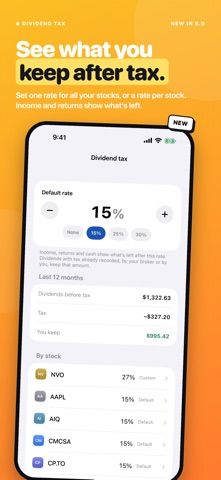
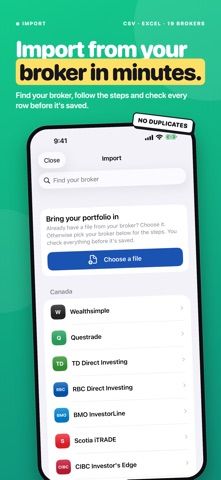
SmartFolio brings investment holdings and transactions into a portfolio tracker designed for iPhone and iPad. It supports stocks, ETFs, funds, indices, and crypto across multiple portfolios and brokerage accounts. Add transactions yourself or import broker history from CSV or Excel, then review holdings, allocation, dividends, and realized or unrealized profit and loss. The app also tracks deposits, withdrawals, fees, interest, and stock splits, with reports and export tools for further analysis. The developer says the app has no subscription, account, or ads, and that portfolio data remains on the device. Market quotes and related information rely on external providers and can be delayed or unavailable. SmartFolio is an organizer and calculation aid, not investment, tax, or trading advice.

SmartFolio - Portfolio Tracker
A local-first investment portfolio tracker for stocks, ETFs, funds, and crypto, with broker imports, performance history, dividends, and reports.
Overview
A closer look at SmartFolio - Portfolio Tracker.
A closer look
App screenshots


Choose with confidence
The useful details.
What it does
- Track stocks, ETFs, funds, indices, and cryptocurrencies across multiple portfolios and accounts.
- Import transaction history or current holdings from supported broker CSV and Excel files.
- Record buys, sells, deposits, withdrawals, fees, dividends, interest, and stock splits.
- Review portfolio history, allocation, performance, and realized or unrealized profit and loss.
- Use reports and export tools to inspect or save portfolio information.
A good fit for
- Investors who want a consolidated view of holdings across brokers and asset types.
- People who prefer local portfolio records and do not want a subscription or account requirement.
- Users who want to import transaction history and review performance over time.
Worth knowing
- Requires iOS 26.2 or later on iPhone or iPad.
- Market quotes and news come from external data providers and may be delayed or unavailable.
- Portfolio calculations depend on the accuracy and completeness of imported or manually entered transactions.
- Reports are informational tools and should not be treated as investment or tax advice.
Frequently asked questions
Answers based on the app’s official listing and reviewed information.
What can I track in SmartFolio?
The listing describes portfolios containing stocks, ETFs, funds, indices, and cryptocurrencies.
Can I import holdings from a broker?
Yes. SmartFolio supports importing transaction history or current holdings from supported CSV and Excel files.
Does it show profit and loss?
Yes. It tracks portfolio performance and reports realized and unrealized profit and loss, along with dividends and other transaction activity.
Where is portfolio data stored?
The developer says portfolio data stays on the device and is not uploaded to a server.
Is SmartFolio free?
The US App Store lists it as free and the developer says there is no subscription, account requirement, or advertising.
What iOS version does SmartFolio require?
Apple currently lists iOS 26.2 or later for iPhone and iPad.
Researched from official sources; this is not a hands-on review. Last checked 2026-11-19.
Keep exploring
More apps that might be a good fit.

Personal Ledger: Pro Finance
An offline double-entry ledger for tracking net worth, assets, liabilities, income, expenses, cash flow, and debts.

my expenses simplified
A basic personal expense tracker with receipt attachments, spending summaries, category budgets, trend charts, and detailed transaction notes.

Kesef: Expense Tracker
An offline expense and budget tracker with voice entry, recurring transactions, multi-currency records, and shared bill splitting.