
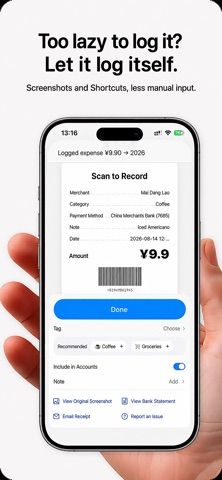
Snapto turns spending records into a visual journal. Capture a receipt or screenshot, add an expense through Shortcuts, and organize transactions with smart rules, categories, merchants, notes, and custom ledgers. The app also includes budgets, asset and liability tracking, savings plans, refunds, reimbursements, multi-currency records, calendar views, widgets, and a map for expenses with locations. The developer says Snapto has no ads and supports iCloud sync; Apple’s privacy label says no data is collected. The U.S. App Store lists Snapto+ at $0.99 monthly, $7.99 yearly, or $12.99 lifetime. It requires iOS 16 or later and supports iPhone and iPad. Photo recognition and imported payment details can be wrong, so check amounts, dates, and categories before using reports for financial decisions.

Snapto: Photo Expense Tracker
A visual expense and asset tracker that turns photos, screenshots, and Shortcuts into illustrated receipts, timelines, budgets, and spending maps.
Overview
A closer look at Snapto: Photo Expense Tracker.
A closer look
App screenshots



Choose with confidence
The useful details.
What it does
- Create expense entries from photos, screenshots, manual input, and Shortcuts.
- Organize receipts with categories, merchants, tags, stickers, timelines, and smart rules.
- Track budgets, assets, liabilities, savings goals, refunds, reimbursements, and multiple currencies.
- Review spending trends and location-based maps; sync through iCloud if enabled.
A good fit for
- People who want a visual record of what they purchased, not only transaction totals.
- Users who want photo capture, shortcuts, budgets, assets, and multi-currency tracking together.
Worth knowing
- Photo or screenshot recognition may misread purchase details; review extracted information.
- The U.S. listing shows Snapto+ at $0.99 monthly, $7.99 yearly, or $12.99 lifetime; confirm which features are included in each plan.
- Requires iOS 16 or later on iPhone or iPad.
- The developer supports optional iCloud sync; review your Apple account and backup settings if you sync financial records.
Frequently asked questions
Answers based on the app’s official listing and reviewed information.
What does Snapto track?
It records expenses and income and can also track budgets, assets, liabilities, savings goals, refunds, and reimbursements.
Can Snapto scan a receipt or screenshot?
Yes. The listing describes capturing expenses from photos and screenshots, as well as using Shortcuts. Review recognized details for accuracy.
Does Snapto show where I spent money?
Yes. The Spending Map can show expenses that include a location.
How much does Snapto+ cost?
The U.S. App Store lists $0.99 monthly, $7.99 yearly, or $12.99 lifetime.
Does Snapto collect my data?
Apple’s App Store privacy label says the developer reports no data collected. The developer also describes optional iCloud sync.
Which devices support Snapto?
The current U.S. listing supports iPhone and iPad and requires iOS 16 or later.
Researched from official sources; this is not a hands-on review. Last checked 2026-11-19.
Keep exploring
More apps that might be a good fit.

Personal Ledger: Pro Finance
An offline double-entry ledger for tracking net worth, assets, liabilities, income, expenses, cash flow, and debts.

my expenses simplified
A basic personal expense tracker with receipt attachments, spending summaries, category budgets, trend charts, and detailed transaction notes.

Kesef: Expense Tracker
An offline expense and budget tracker with voice entry, recurring transactions, multi-currency records, and shared bill splitting.