
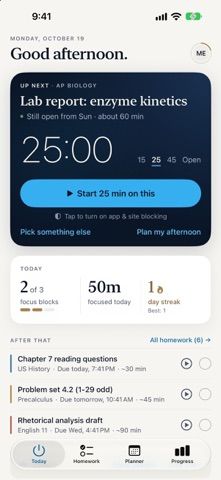
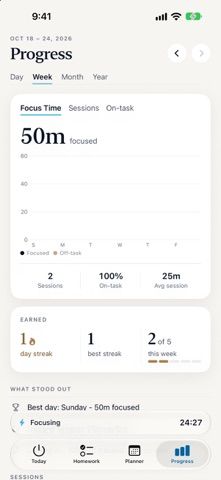
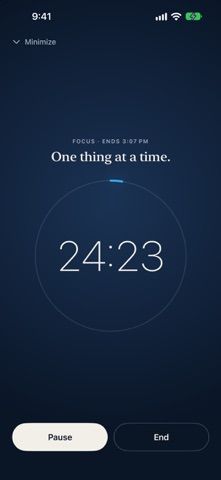
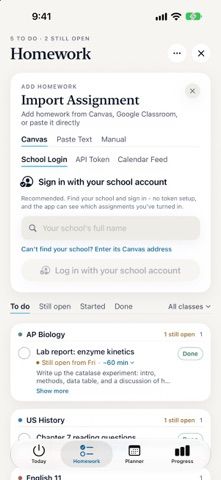
StudyOn combines homework planning with timed focus sessions. Students can add work manually or connect a Canvas account to import assignments, then use Auto-plan to fit tasks around their calendar. Focus rounds can block selected apps and websites through Apple's Screen Time controls, with breaks and an on-screen countdown. The app also reports focus time and streaks, and it offers optional parent and teacher links; students choose what progress information to share. Teachers can use StudyOn for free. StudyOn Parent is a separate paid plan for parents who want session controls and recurring schedules. Screen Time permissions and school account access are required for some functions, so review what data is shared before connecting accounts.

StudyOn: Homework Focus
A homework planner and focus timer that blocks distracting apps during study sessions.
Overview
A closer look at StudyOn: Homework Focus.
A closer look
App screenshots
Choose with confidence
The useful details.
What it does
- Add homework manually or import assignments from a school's Canvas account.
- Use Auto-plan to arrange assignments around a school schedule and calendar.
- Start focus rounds that block selected apps and websites using Screen Time.
- Invite a parent or teacher to view selected student progress data.
A good fit for
- Students who want homework planning and distraction blocking in the same study workflow.
Worth knowing
- Canvas import requires a school account, while app blocking requires Screen Time permissions.
- Some parent controls require StudyOn Parent, listed at $9.99 monthly or $59.99 yearly after a 7-day trial.
- Review sharing choices before linking a parent or teacher account.
Frequently asked questions
Answers based on the app’s official listing and reviewed information.
What is StudyOn: Homework Focus used for?
A homework planner and focus timer that blocks distracting apps during study sessions.
What can you do with StudyOn: Homework Focus?
Add homework manually or import assignments from a school's Canvas account. Use Auto-plan to arrange assignments around a school schedule and calendar. Start focus rounds that block selected apps and websites using Screen Time. Invite a parent or teacher to view selected student progress data.
Who is StudyOn: Homework Focus designed for?
Students who want homework planning and distraction blocking in the same study workflow.
What should you know before downloading StudyOn: Homework Focus?
Canvas import requires a school account, while app blocking requires Screen Time permissions. Some parent controls require StudyOn Parent, listed at $9.99 monthly or $59.99 yearly after a 7-day trial. Review sharing choices before linking a parent or teacher account.
Does StudyOn: Homework Focus include paid features?
StudyOn Parent is listed at $9.99 per month or $59.99 per year, with a 7-day free trial. Confirm eligibility and renewal details before starting.
Which platforms support StudyOn: Homework Focus?
Greatooly's reviewed app information lists iOS.
Researched from official sources; this is not a hands-on review. Last checked 2026-11-04.
Keep exploring
More apps that might be a good fit.

Ahenora: Family Organizer
Ahenora brings family tasks, a shared calendar, meals, shopping lists, children's chores, and household documents together.

Bible Study Planner
Bible Study Planner organizes reading plans, chapter notes, study materials, reminders, and reading progress on Apple devices.

Tidify: Declutter & Clean Home
Tidify turns a room photo into an AI-generated decluttering plan with timed tasks, reminders, and recurring tidy routines.