
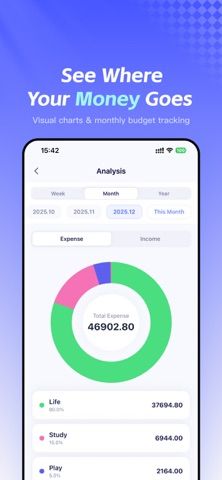
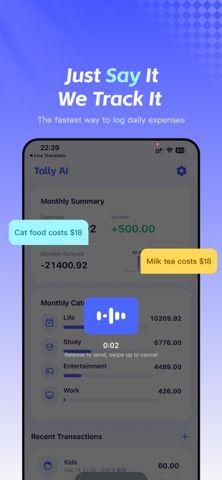
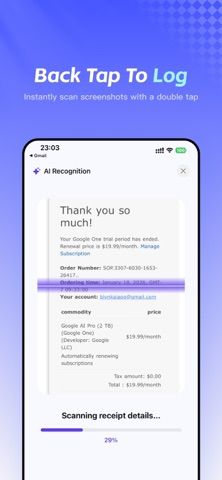
Tally AI Expense Tracker & Log is designed to reduce manual bookkeeping through voice entry and receipt scanning. Speak several purchases at once and the app can split them into transactions with amounts, categories, and dates; receipt photos are processed with OCR to extract expense details. Charts and reports summarize cash flow over weekly, monthly, or yearly periods, while budgets, savings tools, currency conversion, widgets, and Shortcuts support everyday tracking. The developer describes encrypted cloud sync and no advertising in the listing. Apple’s privacy label says financial information, photos or videos, audio, device identifiers, and diagnostics may be linked to the user, so review the privacy policy before sharing financial or receipt content. The free download includes in-app subscriptions, with several MoneyAI price rows whose exact tier mapping should be checked in the purchase screen. Requires iOS 15.1 or later.

Tally AI Expense Tracker & Log
An AI-assisted expense log with voice entry, receipt scanning, spending reports, budgets, currency conversion, and cloud sync.
Overview
A closer look at Tally AI Expense Tracker & Log.
A closer look
App screenshots

Choose with confidence
The useful details.
What it does
- Add multiple transactions by speaking a natural-language expense summary.
- Scan receipts, bills, or handwritten notes and review OCR-extracted transactions.
- View spending patterns and cash flow with charts over weekly, monthly, or yearly periods.
- Set monthly budgets, track savings, and convert spending across currencies.
- Use Home Screen widgets, Control Center, and Shortcuts for faster tracking.
A good fit for
- People who want voice or receipt-based expense entry instead of typing every purchase.
- Travelers who track spending in several currencies.
- Users who want visual reports and shortcuts alongside transaction logging.
Worth knowing
- Requires iOS 15.1 or later.
- Voice and receipt recognition can make mistakes; review the generated transactions before relying on reports.
- Apple’s privacy label includes financial information, photos or videos, audio data, device identifiers, and diagnostics linked to the user.
- The US store displays several MoneyAI subscription price rows, including monthly and annual options at multiple amounts; confirm the exact tier and renewal price in the in-app purchase screen.
Frequently asked questions
Answers based on the app’s official listing and reviewed information.
What does Tally AI track?
It records expenses and budgets, then shows cash-flow and spending reports over weekly, monthly, or yearly periods.
Can Tally AI record several expenses at once?
Yes. The listing describes voice entry that can split a spoken summary into multiple transaction records.
Can it scan receipts?
Yes. The app describes OCR for receipt images, bills, and handwritten notes. Review extracted amounts and categories before saving.
What financial data may be collected?
Apple’s label says financial information, photo or video content, audio data, device identifiers, and diagnostics may be linked to the user. Review the privacy policy before using scans or cloud sync.
How much does Tally AI cost?
The US listing shows multiple MoneyAI subscription rows with monthly and annual prices, but their tier mapping is unclear. Confirm the exact plan and renewal amount in the app.
Which devices support Tally AI?
Apple lists iOS 15.1 or later. The current store record includes iPhone, iPad, and iPod touch compatibility.
Researched from official sources; this is not a hands-on review. Last checked 2026-11-19.
Keep exploring
More apps that might be a good fit.

Personal Ledger: Pro Finance
An offline double-entry ledger for tracking net worth, assets, liabilities, income, expenses, cash flow, and debts.

my expenses simplified
A basic personal expense tracker with receipt attachments, spending summaries, category budgets, trend charts, and detailed transaction notes.

Kesef: Expense Tracker
An offline expense and budget tracker with voice entry, recurring transactions, multi-currency records, and shared bill splitting.