
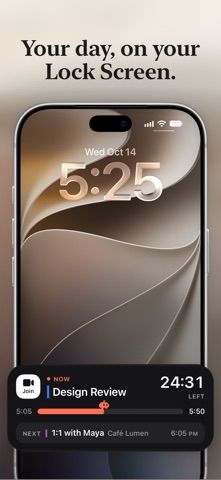
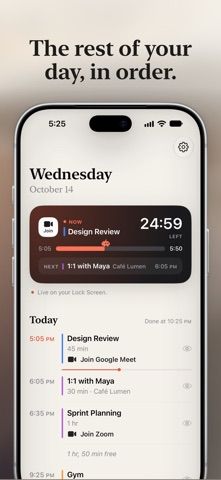
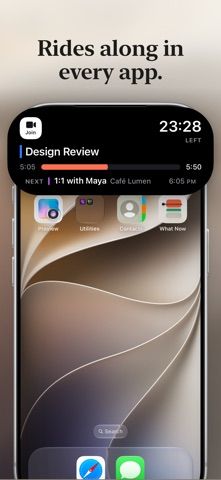
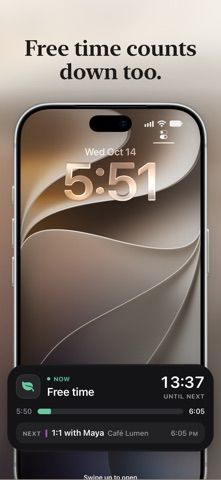
What Now brings a user's existing iPhone calendar into a glanceable live view. While an event is happening, it shows the event, location, and remaining time; between events, it counts down to the next one. The app reads calendars already configured on the phone, including iCloud, Google, Exchange, and Outlook, and supports the Lock Screen, Dynamic Island, StandBy, Apple Watch, and CarPlay Live Activities where available. Its listing says calendar data stays on the device and the app never changes events. The free version supports one calendar; a one-time Pro purchase adds all calendars and meeting-join shortcuts, among other options.
What Now - Live Calendar
A live calendar companion that shows current events and free time on the Lock Screen and Dynamic Island.
By Emadur RahmanReleased 2026/10/20No ratings yetOfficial store informationPublished 2026/11/04Checked 2026-11-04
Overview
A closer look at What Now - Live Calendar.
A closer look
App screenshots
Choose with confidence
The useful details.
What it does
- Show the current event, remaining time, and countdown to the next event.
- Read calendars configured on the iPhone, including iCloud, Google, Exchange, and Outlook.
- Display a Live Activity on supported Lock Screens and Dynamic Island models.
- Use Apple Watch, CarPlay, and Shortcuts integrations described in the listing.
A good fit for
- People who want to see what is happening now and when their next calendar event starts.
Worth knowing
- The free version supports one calendar; following multiple calendars and meeting-join shortcuts require Pro.
- The app needs calendar permission and is designed around iPhone system features; the current one-time Pro price was not captured.
Frequently asked questions
Answers based on the app’s official listing and reviewed information.
What is What Now - Live Calendar used for?
A live calendar companion that shows current events and free time on the Lock Screen and Dynamic Island.
What can you do with What Now - Live Calendar?
Show the current event, remaining time, and countdown to the next event. Read calendars configured on the iPhone, including iCloud, Google, Exchange, and Outlook. Display a Live Activity on supported Lock Screens and Dynamic Island models. Use Apple Watch, CarPlay, and Shortcuts integrations described in the listing.
Who is What Now - Live Calendar designed for?
People who want to see what is happening now and when their next calendar event starts.
What should you know before downloading What Now - Live Calendar?
The free version supports one calendar; following multiple calendars and meeting-join shortcuts require Pro. The app needs calendar permission and is designed around iPhone system features; the current one-time Pro price was not captured.
Does What Now - Live Calendar include paid features?
What Now Pro is a one-time in-app purchase, not a subscription; check the App Store for the current price.
Which platforms support What Now - Live Calendar?
Greatooly's reviewed app information lists iOS.
Researched from official sources; this is not a hands-on review. Last checked 2026-11-04.
Keep exploring
More apps that might be a good fit.

FaveNest – Visual Bookmarks
FaveNest saves links, notes, files, screenshots, and places into a searchable visual library that syncs through private iCloud.
Markdown Studio Pro
Markdown Studio Pro edits portable Markdown files with source and live-preview modes, folder workspaces, themes, and export tools.

Family Organizer: FamHead
FamHead is a family organizer for shared tasks, grocery lists, household decisions, reminders, widgets, and home inventory.