
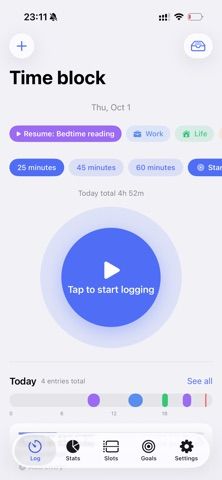
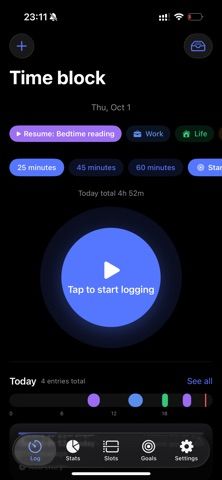
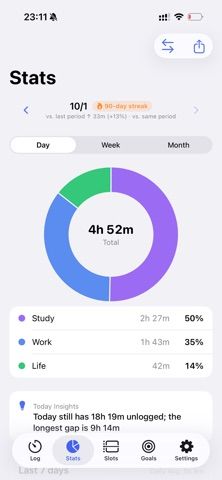
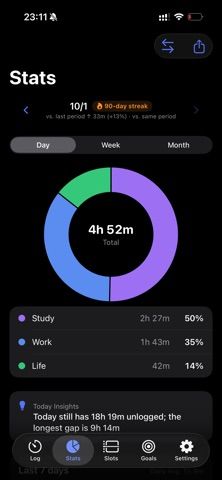
WhereTimeGo records time with a single tap, letting users categorize a block afterward instead of setting up a project first. The listing describes daily, weekly, and monthly charts, time-of-day analysis, period comparisons, a year heatmap, and a Pomodoro-style focus timer. Users can also set longer-term goals and track milestones, with widgets and Apple Watch controls available. The developer says records stay on device by default, the app works offline, and iCloud sync is optional. It is described as free with every feature unlocked and no subscription, in-app purchases, or ads. Time tracking still depends on remembering to start and stop sessions, so it may not replace an automatic timesheet or calendar integration.
WhereTimeGo: Time Tracker
A one-tap time tracker with focus sessions, category charts, goals, widgets, and optional iCloud sync.
By 东申 王Released 2026/10/04No ratings yetOfficial store informationPublished 2026/11/04Checked 2026-11-04
Overview
A closer look at WhereTimeGo: Time Tracker.
A closer look
App screenshots
Choose with confidence
The useful details.
What it does
- Starts and stops time blocks with one tap and allows later categorization.
- Shows period charts, time-of-day analysis, comparisons, and yearly activity views.
- Includes focus sessions, long-term goals, widgets, Apple Watch controls, and optional iCloud sync.
A good fit for
- People who want to understand where their work or study hours go.
- Freelancers and habit builders who prefer quick manual time tracking.
Worth knowing
- Tracking depends on starting and stopping sessions; the listing does not describe automatic activity capture or client billing tools.
Frequently asked questions
Answers based on the app’s official listing and reviewed information.
What is WhereTimeGo: Time Tracker used for?
A one-tap time tracker with focus sessions, category charts, goals, widgets, and optional iCloud sync.
What can you do with WhereTimeGo: Time Tracker?
Starts and stops time blocks with one tap and allows later categorization. Shows period charts, time-of-day analysis, comparisons, and yearly activity views. Includes focus sessions, long-term goals, widgets, Apple Watch controls, and optional iCloud sync.
Who is WhereTimeGo: Time Tracker designed for?
People who want to understand where their work or study hours go. Freelancers and habit builders who prefer quick manual time tracking.
What should you know before downloading WhereTimeGo: Time Tracker?
Tracking depends on starting and stopping sessions; the listing does not describe automatic activity capture or client billing tools.
Does WhereTimeGo: Time Tracker include paid features?
The reviewed listing reports no in-app purchases.
Which platforms support WhereTimeGo: Time Tracker?
Greatooly's reviewed app information lists iOS.
Researched from official sources; this is not a hands-on review. Last checked 2026-11-04.
Keep exploring
More apps that might be a good fit.

CleanHaus: Airbnb Turnovers
CleanHaus automates short-term rental turnovers by connecting booking calendars with cleaners, schedules and property tasks.

GoalStar: Daily Goal Tracker
GoalStar makes daily goals visible with a gold-star chart, streaks, reminders, widgets and optional NFC tap tags.

Accessbox - Password Manager
Accessbox stores passwords, passkeys and verification codes in encrypted Accesscards with AutoFill, breach alerts and optional iCloud sync.