
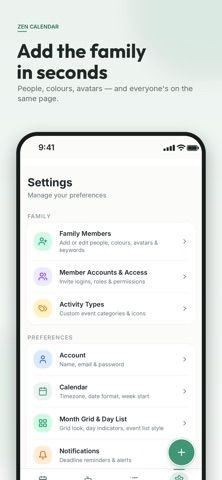
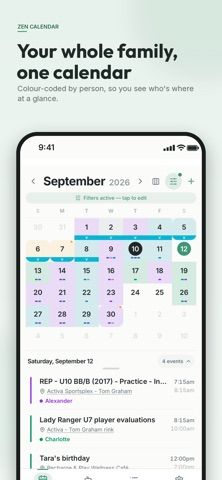
ZenCalendar brings household schedules together in a shared calendar. Each family member has a color, and events can be assigned to the people they concern, such as a parent, child, or caregiver. A Family Assistant accepts typed or spoken plain-language requests to add or update events. The app can combine subscribed Google, Apple, Outlook, school, and team iCal calendars, and it can publish feeds for relatives or coaches to follow. Shared tags let groups exchange school or sports dates without automatically adding them to everyone's calendar. The listing describes iPhone, iPad, and Apple Watch support, reminders, email-to-event forwarding, and view-only or full-access sharing. ZenCalendar is free to start, but the store description does not specify account, sync, or premium limits, so confirm those details before inviting a household.

ZenCalendar Family Organizer
A shared family calendar with natural-language event entry, color-coded schedules, iCal feeds, and shared tags.
Overview
A closer look at ZenCalendar Family Organizer.
A closer look
App screenshots
Choose with confidence
The useful details.
What it does
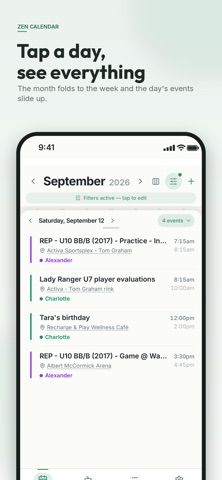
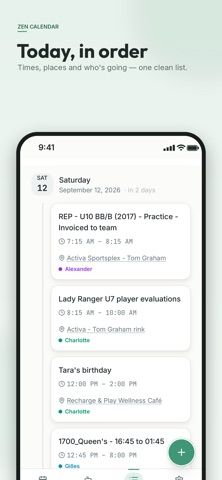
- View color-coded family calendars by month, week, or agenda
- Add or update events through typed or spoken plain-language requests
- Subscribe to and publish iCal feeds for common calendar services and groups
- Share calendars with selected access levels and exchange dates through shared tags
A good fit for
- Families coordinating school, sports, appointments, and household schedules
- Parents who need to share selected events with relatives, sitters, or coaches
Worth knowing
- The listing says the app is free to start but does not describe account, sharing, sync, or paid-feature limits.
Frequently asked questions
Answers based on the app’s official listing and reviewed information.
What is ZenCalendar Family Organizer used for?
A shared family calendar with natural-language event entry, color-coded schedules, iCal feeds, and shared tags.
What can you do with ZenCalendar Family Organizer?
View color-coded family calendars by month, week, or agenda Add or update events through typed or spoken plain-language requests Subscribe to and publish iCal feeds for common calendar services and groups Share calendars with selected access levels and exchange dates through shared tags
Who is ZenCalendar Family Organizer designed for?
Families coordinating school, sports, appointments, and household schedules Parents who need to share selected events with relatives, sitters, or coaches
What should you know before downloading ZenCalendar Family Organizer?
The listing says the app is free to start but does not describe account, sharing, sync, or paid-feature limits.
Does ZenCalendar Family Organizer include paid features?
The developer describes ZenCalendar as free to start.
Which platforms support ZenCalendar Family Organizer?
Greatooly's reviewed app information lists iOS.
Researched from official sources; this is not a hands-on review. Last checked 2026-11-04.
Keep exploring
More apps that might be a good fit.

FaveNest – Visual Bookmarks
FaveNest saves links, notes, files, screenshots, and places into a searchable visual library that syncs through private iCloud.
Markdown Studio Pro
Markdown Studio Pro edits portable Markdown files with source and live-preview modes, folder workspaces, themes, and export tools.

Family Organizer: FamHead
FamHead is a family organizer for shared tasks, grocery lists, household decisions, reminders, widgets, and home inventory.