
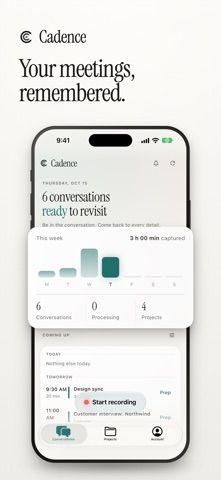
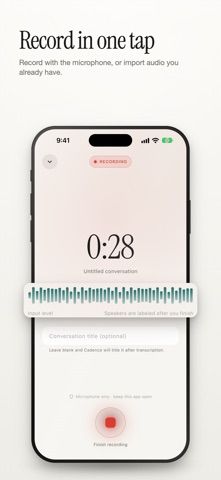
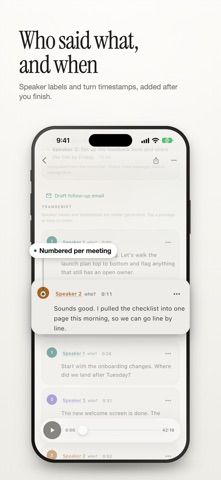
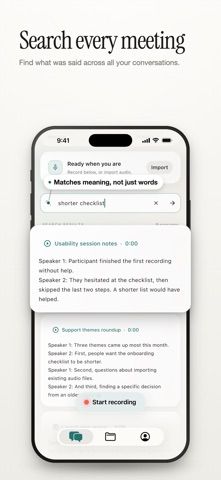
Cadence records meetings and turns them into transcripts, summaries, decisions, and action items linked to the moment they were said. Users can record on iPhone or Apple Watch, import audio, or capture microphone and call audio from the Mac menu bar. Speaker labels and timestamps help people review who said what, while search jumps to the relevant passage or recording. Calendar connection can attach meeting titles, invitees, and project details, and a meeting or project can be shared with collaborators. The free tier includes two transcription hours each week; Cadence Pro removes that weekly limit with monthly or annual subscriptions. Transcription and summaries run in the cloud, so the app requires an internet connection and verified account. The developer warns that AI transcripts and speaker labels can be wrong. Users should check recordings when accuracy matters and get any required consent before recording.

Cadence: AI Meeting Notes
An AI meeting recorder that links summaries, decisions, and action items to searchable transcript moments.
Overview
A closer look at Cadence: AI Meeting Notes.
A closer look
App screenshots
Choose with confidence
The useful details.
What it does
- Record on iPhone or Apple Watch, capture audio on Mac, or import existing recordings.
- Create speaker-labeled transcripts with timestamps and search across meetings.
- Review summaries, decisions, and action items linked to source passages.
- Connect a calendar and share meetings or project notes with collaborators.
A good fit for
- People who need searchable meeting notes with source-linked summaries and action items.
Worth knowing
- Free use is limited to two transcription hours per week; Pro is a monthly or annual subscription with pricing shown in the App Store. Cloud transcription requires internet and a verified account. AI output may contain errors; obtain required recording consent.
Frequently asked questions
Answers based on the app’s official listing and reviewed information.
What is Cadence: AI Meeting Notes used for?
An AI meeting recorder that links summaries, decisions, and action items to searchable transcript moments.
What can you do with Cadence: AI Meeting Notes?
Record on iPhone or Apple Watch, capture audio on Mac, or import existing recordings. Create speaker-labeled transcripts with timestamps and search across meetings. Review summaries, decisions, and action items linked to source passages. Connect a calendar and share meetings or project notes with collaborators.
Who is Cadence: AI Meeting Notes designed for?
People who need searchable meeting notes with source-linked summaries and action items.
What should you know before downloading Cadence: AI Meeting Notes?
Free use is limited to two transcription hours per week; Pro is a monthly or annual subscription with pricing shown in the App Store. Cloud transcription requires internet and a verified account. AI output may contain errors; obtain required recording consent.
Does Cadence: AI Meeting Notes include paid features?
Free tier includes two transcription hours each week. Cadence Pro offers monthly and annual auto-renewing plans for unlimited personal transcription under a fair-use policy; confirm current US pricing before subscribing.
Which platforms support Cadence: AI Meeting Notes?
Greatooly's reviewed app information lists iOS.
Researched from official sources; this is not a hands-on review. Last checked 2026-11-04.
Keep exploring
More apps that might be a good fit.

FaveNest – Visual Bookmarks
FaveNest saves links, notes, files, screenshots, and places into a searchable visual library that syncs through private iCloud.
Markdown Studio Pro
Markdown Studio Pro edits portable Markdown files with source and live-preview modes, folder workspaces, themes, and export tools.

Family Organizer: FamHead
FamHead is a family organizer for shared tasks, grocery lists, household decisions, reminders, widgets, and home inventory.