
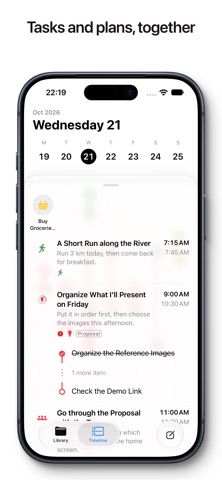
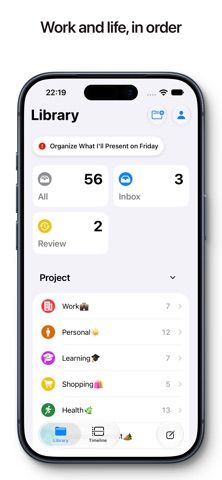
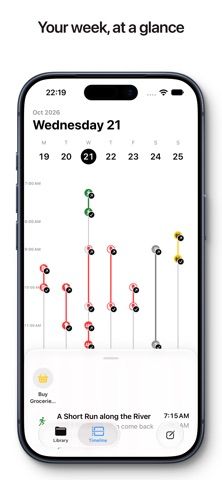
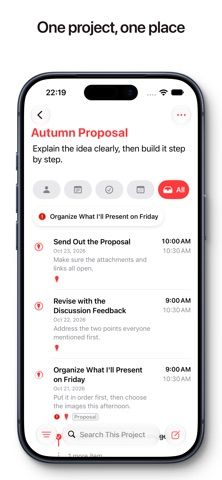
Life Metro combines tasks, events, and notes in a project-based library. Users can plan by day or month, capture an idea in an inbox before deciding how to organize it, and connect one item to more than one project. Each item can keep notes, remarks, locations, images, and attachments. A review feature lets users choose a period and project, look back on completed work, record outcomes, and turn next steps into new items. The free app includes its core planner, while Pro adds calendar and Reminders import and sync, iCloud sync, and custom notifications through monthly, annual, or lifetime options. Prices and trial eligibility appear in the app. Because Pro includes sync, set up a backup before moving important planning data from another system.
Life Metro: Daily Planner
A daily planner that connects tasks, events, notes, projects, timelines, and periodic reviews.
Overview
A closer look at Life Metro: Daily Planner.
A closer look
App screenshots
Choose with confidence
The useful details.
What it does
- Manage tasks, events, and notes in a shared library organized by projects.
- Capture ideas in an inbox and organize them later with dates and project links.
- Review work across a selected period and convert next steps into actionable items.
- Use Pro for calendar and Reminders sync, iCloud sync, and custom notifications.
A good fit for
- People who want to connect project notes and tasks with a daily and monthly timeline.
Worth knowing
- Calendar import, Reminders sync, iCloud sync, and custom notifications require Pro.
- The listing does not show Pro prices or trial eligibility; check the in-app store.
- Review sync and backup settings before relying on it as the only copy of important plans.
Frequently asked questions
Answers based on the app’s official listing and reviewed information.
What is Life Metro: Daily Planner used for?
A daily planner that connects tasks, events, notes, projects, timelines, and periodic reviews.
What can you do with Life Metro: Daily Planner?
Manage tasks, events, and notes in a shared library organized by projects. Capture ideas in an inbox and organize them later with dates and project links. Review work across a selected period and convert next steps into actionable items. Use Pro for calendar and Reminders sync, iCloud sync, and custom notifications.
Who is Life Metro: Daily Planner designed for?
People who want to connect project notes and tasks with a daily and monthly timeline.
What should you know before downloading Life Metro: Daily Planner?
Calendar import, Reminders sync, iCloud sync, and custom notifications require Pro. The listing does not show Pro prices or trial eligibility; check the in-app store. Review sync and backup settings before relying on it as the only copy of important plans.
Does Life Metro: Daily Planner include paid features?
Life Metro Pro is offered monthly or yearly with automatic renewal. Check current prices and any trial eligibility in the app. The listing also offers a lifetime plan as a one-time purchase; verify its current price in the app.
Which platforms support Life Metro: Daily Planner?
Greatooly's reviewed app information lists iOS.
Researched from official sources; this is not a hands-on review. Last checked 2026-11-04.
Keep exploring
More apps that might be a good fit.

FaveNest – Visual Bookmarks
FaveNest saves links, notes, files, screenshots, and places into a searchable visual library that syncs through private iCloud.
Markdown Studio Pro
Markdown Studio Pro edits portable Markdown files with source and live-preview modes, folder workspaces, themes, and export tools.

Family Organizer: FamHead
FamHead is a family organizer for shared tasks, grocery lists, household decisions, reminders, widgets, and home inventory.