
Notebooks is a writing and organization app for keeping notes, documents, and lightweight projects together. It supports formatted text, plain text, and Markdown, with attachments, tables, checklists, and Apple Pencil annotations. Users can arrange material in nested books, link documents together, and turn documents or books into tasks and project lists. The developer says files remain in standard formats and can be exported or moved, and describes sync across iPhone, iPad, Mac, and PC. The iOS app is listed at US$17.99 in the US when checked. Its many organization options may take time to set up; confirm platform compatibility and the current one-time price before purchase.
Notebooks: Write and Organize
Write and organize notes, project lists, research, and documents as standard files with search, Markdown, checklists, and cross-device sync.
By Alfons SchmidApp Store rating 4.7 (1,071)Official store informationPublished 2026/11/03Checked 2026-11-03
Overview
A closer look at Notebooks: Write and Organize.
A closer look
App screenshots
Choose with confidence
The useful details.
What it does
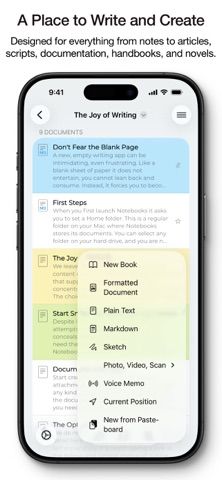
- Create formatted, plain-text, or Markdown documents.
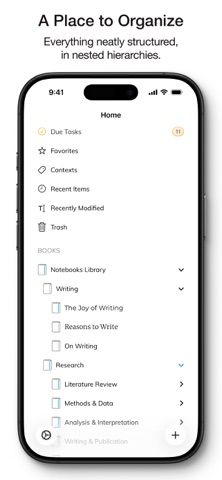
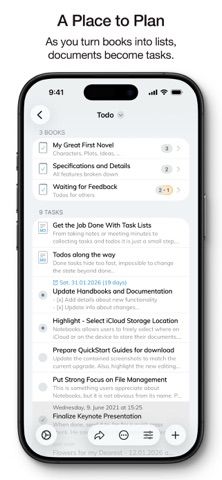
- Organize notes in books and nested hierarchies with links and backlinks.
- Add checklists, tasks, due dates, and reminders to documents or projects.
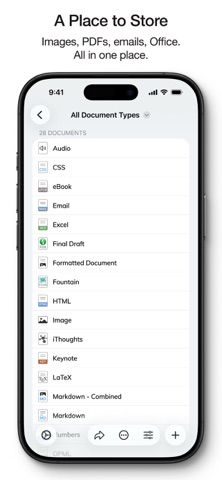
- Import and annotate files, search document text, and sync across supported devices.
A good fit for
- Writers and researchers who want a portable document library with lightweight task features.
Worth knowing
- The flexible structure can require setup and may be more than a simple notes app needs.
- The US listing showed a US$17.99 paid download when checked; verify current regional pricing and platform availability.
- Review sync and backup settings before storing the only copy of important documents.
Frequently asked questions
Answers based on the app’s official listing and reviewed information.
What is Notebooks: Write and Organize used for?
Write and organize notes, project lists, research, and documents as standard files with search, Markdown, checklists, and cross-device sync.
What can you do with Notebooks: Write and Organize?
Create formatted, plain-text, or Markdown documents. Organize notes in books and nested hierarchies with links and backlinks. Add checklists, tasks, due dates, and reminders to documents or projects. Import and annotate files, search document text, and sync across supported devices.
Who is Notebooks: Write and Organize designed for?
Writers and researchers who want a portable document library with lightweight task features.
What should you know before downloading Notebooks: Write and Organize?
The flexible structure can require setup and may be more than a simple notes app needs. The US listing showed a US$17.99 paid download when checked; verify current regional pricing and platform availability. Review sync and backup settings before storing the only copy of important documents.
Does Notebooks: Write and Organize include paid features?
The reviewed listing reports no in-app purchases.
Which platforms support Notebooks: Write and Organize?
Greatooly's reviewed app information lists iOS.
Researched from official sources; this is not a hands-on review. Last checked 2026-11-03.
Keep exploring
More apps that might be a good fit.

FaveNest – Visual Bookmarks
FaveNest saves links, notes, files, screenshots, and places into a searchable visual library that syncs through private iCloud.
Markdown Studio Pro
Markdown Studio Pro edits portable Markdown files with source and live-preview modes, folder workspaces, themes, and export tools.

Family Organizer: FamHead
FamHead is a family organizer for shared tasks, grocery lists, household decisions, reminders, widgets, and home inventory.