
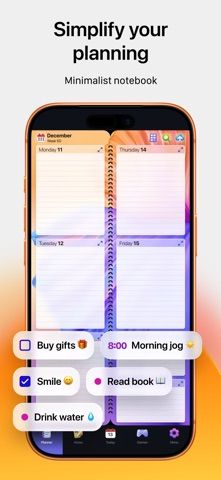
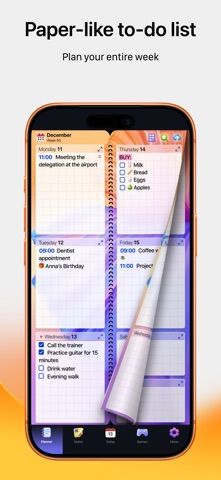
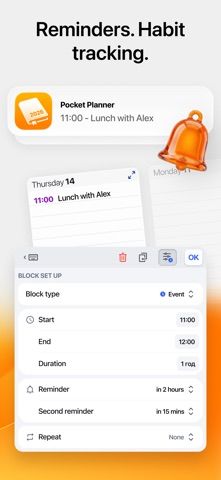
Pocket Planner presents tasks and notes in a paper-style weekly calendar with page-flipping navigation. Users can add dated plans, habits, shopping lists, client notes, or general to-dos, then format entries with colors and text styles. The listing also describes a separate notes page, speech input, and views that move from week to day. This approach may suit people who prefer a visual notebook over a project board. The app combines several personal planning tools, so check how its calendar data syncs with other services and which layouts or themes require payment before moving an existing workflow.
ProductivityCalendar appsEmail client appsNote-taking appsProject management appsTask management appsTo-do list apps
Pocket Planner, Calendar, Note
Combine weekly planning, dated notes, habits, and task lists in a paper-style planner with Pocket Planner.
By Digital Legal TechApp Store rating 4.7 (1,428)Official store informationPublished 2026/11/03Checked 2026-11-03
Overview
A closer look at Pocket Planner, Calendar, Note.
A closer look
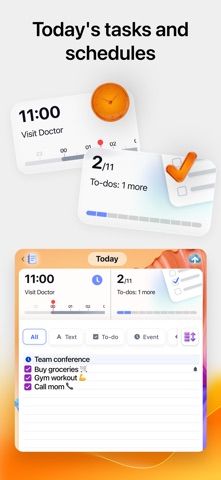
App screenshots
Choose with confidence
The useful details.
What it does
- Plan tasks and events in weekly and daily views.
- Keep undated notes and lists on a separate page.
- Format entries with colors and text styles.
- Use speech input and navigate to past or future dates.
A good fit for
- People who like a paper diary layout for personal plans, notes, and lists.
Worth knowing
- The paper-style layout may not suit users who need boards, dependencies, or team collaboration.
- Check calendar sync, backups, and data export before making it the only copy of important plans.
- Verify current free limits and paid options in the App Store.
Frequently asked questions
Answers based on the app’s official listing and reviewed information.
What is Pocket Planner, Calendar, Note used for?
Combine weekly planning, dated notes, habits, and task lists in a paper-style planner with Pocket Planner.
What can you do with Pocket Planner, Calendar, Note?
Plan tasks and events in weekly and daily views. Keep undated notes and lists on a separate page. Format entries with colors and text styles. Use speech input and navigate to past or future dates.
Who is Pocket Planner, Calendar, Note designed for?
People who like a paper diary layout for personal plans, notes, and lists.
What should you know before downloading Pocket Planner, Calendar, Note?
The paper-style layout may not suit users who need boards, dependencies, or team collaboration. Check calendar sync, backups, and data export before making it the only copy of important plans. Verify current free limits and paid options in the App Store.
Does Pocket Planner, Calendar, Note include paid features?
The reviewed listing does not confirm current in-app purchase options.
Which platforms support Pocket Planner, Calendar, Note?
Greatooly's reviewed app information lists iOS.
Researched from official sources; this is not a hands-on review. Last checked 2026-11-03.
Keep exploring
More apps that might be a good fit.

FaveNest – Visual Bookmarks
FaveNest saves links, notes, files, screenshots, and places into a searchable visual library that syncs through private iCloud.
Markdown Studio Pro
Markdown Studio Pro edits portable Markdown files with source and live-preview modes, folder workspaces, themes, and export tools.

Family Organizer: FamHead
FamHead is a family organizer for shared tasks, grocery lists, household decisions, reminders, widgets, and home inventory.